7.9k Views
18 Executions

Does it work?
No reports yetNo reports yet. Tried it? Be the first to say.
Also noticed:
Description
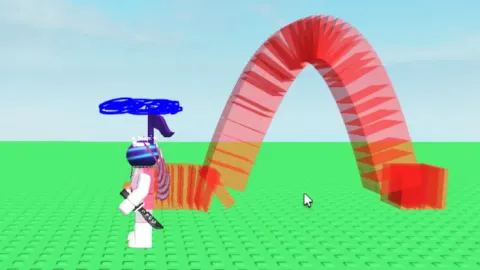
shows your trajectory like in the image, very useful i know. adjust the settings as your likings NOTE: This is a reupload due to the data rollback, you may have already seen this.
local Players = game:GetService("Players")
local player = Players.LocalPlayer
local character = player.Character or player.CharacterAdded:Wait()
local humanoidRootPart = character:WaitForChild("HumanoidRootPart")

local trajectoryEnabled = false --T to toggle it
local trajectoryColor = Color3.fromRGB(255, 0, 0)
local trajectoryThickness = 2

local trajectoryPoints = {} -- Stores the trajectory points
local trajectoryParts = {} -- Stores the trajectory part instances


local function updateTrajectoryPoints()
    if trajectoryEnabled then
        table.insert(trajectoryPoints, humanoidRootPart.Position)
        if #trajectoryPoints > 100 then
            table.remove(trajectoryPoints, 1)
        end
    else
        trajectoryPoints = {}
    end
end


local function drawTrajectory()
    for i = 1, #trajectoryParts do
        trajectoryParts[i]:Destroy()
    end
    trajectoryParts = {}

    if trajectoryEnabled and #trajectoryPoints > 1 then
        for i = 1, #trajectoryPoints - 1 do
            local startPoint = trajectoryPoints[i]
            local endPoint = trajectoryPoints[i + 1]
            if startPoint and endPoint then
                local segment = Instance.new("Part")
                segment.Name = "TrajectorySegment"
                segment.BrickColor = BrickColor.new(trajectoryColor)
                segment.Size = Vector3.new(trajectoryThickness, trajectoryThickness, (endPoint - startPoint).Magnitude)
Comments
0Log in to join the conversation. Login
No comments yet. Be the first!