5.5k Views
381 Executions
Universal Hub 2026 Rayfield Edition
Universal Script 📌
Simonahello24First script
9 months ago
Please login to perform these actions:Does it work?
No reports yetNo reports yet. Tried it? Be the first to say.
Also noticed:
Description
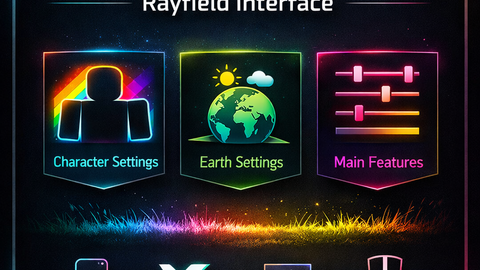
Universal Hub 2026 is a compact, all-in-one client-side script for Roblox, built with the Rayfield UI library. Features: - Main Features: WalkSpeed, JumpPower sliders, Nuke (client-side) - Character Settings: God Mode, Noclip, Rainbow Character, Rainbow Walls - Earth Settings: Remove/Add Fog, Time control, Rainbow Environment - Organized into tabs for easy access Supports mobile and PC executors: - Delta Mobile - Synapse X - Krnl - SirHurt - Other executors that support Rayfield Safe, compact, and optimized to run under 150 lines for mobile-friendly performance.
-- Rayfield 2026 Hub Compact
local Rayfield = loadstring(game:HttpGet('https://sirius.menu/rayfield'))()
local Players, RunService, Lighting, Workspace, UIS = game:GetService("Players"), game:GetService("RunService"), game:GetService("Lighting"), game:GetService("Workspace"), game:GetService("UserInputService")
local player = Players.LocalPlayer
local char = player.Character or player.CharacterAdded:Wait()
local humanoid = char:WaitForChild("Humanoid")
local hrp = char:WaitForChild("HumanoidRootPart")

-- Utils
local function rainbowParts(parts)
    for _, p in pairs(parts) do
        if p:IsA("BasePart") then
            p.Color = Color3.fromHSV(tick()%10/10,1,1)
        end
    end
end

-- Window
local Window = Rayfield:CreateWindow({
    Name="Universal Hub 2026",
    LoadingTitle="Rayfield Interface",
    LoadingSubtitle="by NEDUKAS152015",
    ConfigurationSaving={Enabled=false}
})

-- Tabs
local MainTab = Window:CreateTab("Main Features")
local CharTab = Window:CreateTab("Character Settings")
local EarthTab = Window:CreateTab("Earth Settings")

-- ===== Main Features =====
MainTab:CreateSlider({Name="WalkSpeed",Range={16,500},Increment=1,CurrentValue=16,Callback=function(v) humanoid.WalkSpeed=v end})
MainTab:CreateSlider({Name="JumpPower",Range={50,500},Increment=1,CurrentValue=50,Callback=function(v) humanoid.JumpPower=v end})
MainTab:CreateButton({Name="Nuke (Client Side)",Callback=function()
    local hrp=char:FindFirstChild("HumanoidRootPart")
    if hrp then
        local e=Instance.new("Explosion")
        e.Position=hrp.Position;e.BlastRadius=500;e.BlastPressure=1e6;e.Parent=Workspace
        Rayfield:Notify({Title="Nuke",Content="Nuke deployed!",Duration=3})
    end




The script will always work unless Rayfield is down