757 Views
170 Executions
Does it work?
No reports yetNo reports yet. Tried it? Be the first to say.
Also noticed:
Description
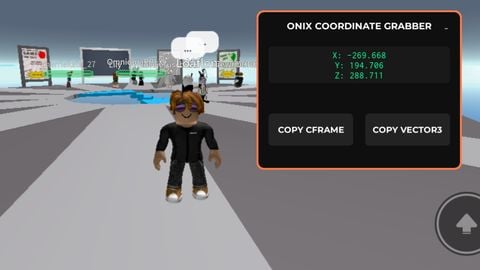
Universal Cords grabber. It's open source so don't mind taking it but give credits. Basically good for teleports in your game scripts.
-- [[ UNIVERSAL COORDINATE GRABBER BY ONIX ]] --
local Players = game:GetService("Players")
local RunService = game:GetService("RunService")
local lp = Players.LocalPlayer
local set_clip = setclipboard or toclipboard or set_clipboard or print

-- UI Root
local ScreenGui = Instance.new("ScreenGui")
ScreenGui.Name = "OnixCoordGrabber"
ScreenGui.Parent = game:GetService("CoreGui")
ScreenGui.ResetOnSpawn = false

-- [[ MAIN UI ]] --
local Main = Instance.new("Frame")
Main.Size = UDim2.new(0, 220, 0, 170)
Main.Position = UDim2.new(0.5, -110, 0.5, -85)
Main.BackgroundColor3 = Color3.fromRGB(15, 15, 15)
Main.BorderSizePixel = 0
Main.Active = true
Main.Draggable = true
Main.Parent = ScreenGui

local MainStroke = Instance.new("UIStroke")
MainStroke.Thickness = 2
MainStroke.ApplyStrokeMode = Enum.ApplyStrokeMode.Border
MainStroke.Parent = Main

local MainCorner = Instance.new("UICorner")
MainCorner.CornerRadius = UDim.new(0, 6)
MainCorner.Parent = Main

-- Rainbow Border
task.spawn(function()
    while task.wait() do
        MainStroke.Color = Color3.fromHSV(tick() % 5 / 5, 0.7, 1)
    end
end)

-- Title
local Title = Instance.new("TextLabel")
How do you use it
@Masonb11745 just copy it
Walk around and copy the cframe or vector 3
I can make an another version that has more
Comment if need help and give suggestions for next script