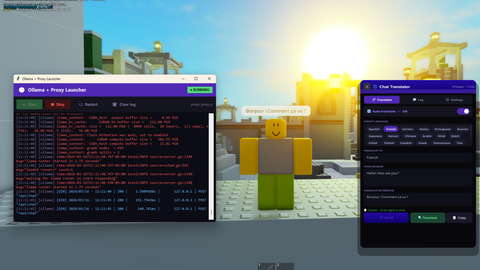
Translator GUI
Universal Script 📌
Does it work?
No reports yetNo reports yet. Tried it? Be the first to say.
Description
- THIS SCRIPT HAS ONLY BEEN TESTED IN WINDOWS. I DO NOT THINK MY SCRIPTS WOULD WORK ON ANY MOBILE DEVICE. - This is a claude-made GUI that can automatically translate your scripts using ollama to run AI models to translate for you. Requirements: Any Executor Node.JS Python Ollama Once you have all of them installed, you must open command prompt or terminal and put one of these in: ollama pull qwen2.5:1.5b or ollama pull qwen2.5:7b You can choose between one of these models in the settings. For more accuracy, choose 7b. For more speed (which I recommend), choose 1.5b. Once ollama is finished pulling the small language models, you can use an automated app I made for launching the servers. This requires python, which is why I asked you to download it. Note: This app is made entirely in python so if you own any anti-virus, it will ask to scan it. It shouldn't be flagged since it isn't malware. https://www.mediafire.com/file/ci3lwhri7gcnfqi/OllamaLauncher.exe/file Here is the virus total: https://www.virustotal.com/gui/file/f44f198c743ab85e94f7e900b24908696f07642347676fd7c6a0c1ea4c077f97/detection This only detects as "Suspicious" since it is used to run the local ollama server on your computer. It isn't flagged by major antiviruses such as Kaspersky, Norton, nor MalwareBytes since they can test the app in a sandbox easier and note it isn't malware. Note: Most times it will fail when running the server, this is most likely going to look like this error: [ollama] Error: listen tcp 127.0.0.1:11434: bind: Only one usage of each socket address (protocol/network address/port) is normally permitted. The reason this error occurs is because you have ollama running in the background. To exit the program: Open task manager, manually find ollama, and kill all processes named ollama. Then, try to run the server. It should run now. Once the server is running (don't mind red, red doesn't always mean errors), you will see the proxy beginning to run locally. What you can do now is join any roblox game with your executor. Then, execute this script into the game. You will see a gui for translating. I made some settings that you can tweak around with. Have fun! Also, it is prompt based so yes, theoretically, you can make it speak any language.
-- ============================================================
-- Chat Translator — Full Rewrite
-- Floating chat bar works from ANY tab when auto-translate is on
-- ============================================================

local Players         = game:GetService("Players")
local LocalPlayer     = Players.LocalPlayer
local PlayerGui       = LocalPlayer:WaitForChild("PlayerGui")
local HttpService     = game:GetService("HttpService")
local TextChatService = game:GetService("TextChatService")
local UIS             = game:GetService("UserInputService")

-- ============================================================
-- SETTINGS
-- ============================================================
local Settings = {
    ollamaHost  = "http://127.0.0.1:3000",
    ollamaModel = "qwen2.5:1.5b",
    toggleKey   = Enum.KeyCode.F6,
    chatKey     = Enum.KeyCode.T,
    windowSize  = "Normal",
    -- "preview" = Enter translates + copies to clipboard, second Enter sends
    -- "send"    = Enter translates and sends immediately
    enterMode   = "preview",
}

local SIZES = {
    Small  = Vector2.new(320, 480),
    Normal = Vector2.new(400, 580),
    Large  = Vector2.new(500, 700),
}

-- ============================================================
-- HTTP
-- ============================================================
local function httpRequest(url, method, headers, body)
    local req = (syn and syn.request) or (http and http.request) or request
    if not req then
        warn("[CT] No HTTP function available")
        return nil





having a bit of a error with the launcher " proxy.js not found at: C:\Users\Matthew\OneDrive\Do*ents\Projects\LuaTranslator\proxy.js [01:09:06] [sys] Edit PROXY_SCRIPT path at the top of launcher.py"
to note i downloaded all the requirements you put in the description
sorry but i would like you to add a loadstring
@Dorean you can't really do loadstring with this since it has settings that you may have to tweak.
I made this video showcasing this script: https://www.youtube.com/watch?v=_rty5aET4fI&t=4s If anyone needs a tutorial on how to set it up, ask any time.