4.3k Views
21 Executions
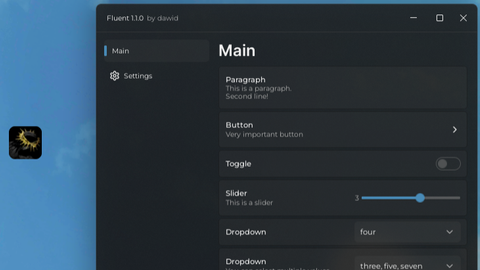
Toggle ui for fluent ui without keybind
Universal Script 📌
Seven7First script
2 years ago
Please login to perform these actions:Does it work?
No reports yetNo reports yet. Tried it? Be the first to say.
Also noticed:
Description
Toggle ui for fluent ui without using keybind
Updates
Script edited: Update script
Script edited: Update script
local Fluent = loadstring(game:HttpGet("https://github.com/dawid-scripts/Fluent/releases/latest/download/main.lua"))()
local SaveManager = loadstring(game:HttpGet("https://raw.githubusercontent.com/dawid-scripts/Fluent/master/Addons/SaveManager.lua"))()
local InterfaceManager = loadstring(game:HttpGet("https://raw.githubusercontent.com/dawid-scripts/Fluent/master/Addons/InterfaceManager.lua"))()

local Window = Fluent:CreateWindow({
    Title = "Fluent " .. Fluent.Version,
    SubTitle = "by dawid",
    TabWidth = 160,
    Size = UDim2.fromOffset(580, 460),
    Acrylic = true,
    Theme = "Dark",
    MinimizeKey = Enum.KeyCode.LeftControl
})

local Tabs = {
    Main = Window:AddTab({ Title = "Main", Icon = "" }),
    Settings = Window:AddTab({ Title = "Settings", Icon = "settings" })
}

local Options = Fluent.Options

do
    Fluent:Notify({
        Title = "Notification",
        Content = "This is a notification",
        SubContent = "SubContent",
        Duration = 5
    })

    Tabs.Main:AddParagraph({
        Title = "Paragraph",
        Content = "This is a paragraph.\nSecond line!"
    })

    Tabs.Main:AddButton({
        Title = "Button",
        Description = "Very important button",
        Callback = function()
            Window:Dialog({




@Nman something like this is not even hard to make
@Nman nah
this is so gpt'd