3.7k Views
216 Executions
Teleport
Universal Script 📌
glebbuba686First script
2 years ago
Please login to perform these actions:Does it work?
No reports yetNo reports yet. Tried it? Be the first to say.
Also noticed:
Description
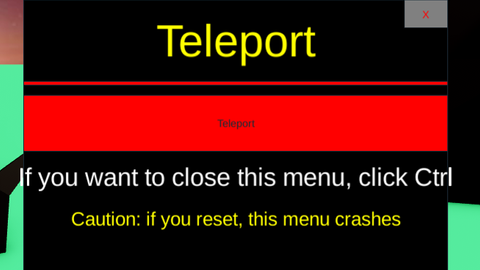
This is a teleport
Updates
Script edited: Update script
local player = game.Players.LocalPlayer
local playerGui = player:WaitForChild("PlayerGui")
local userInputService = game:GetService("UserInputService")


local screenGui = Instance.new("ScreenGui", playerGui)


local menuFrame = Instance.new("Frame", screenGui)
menuFrame.Size = UDim2.new(0.3, 0, 0.4, 0)
menuFrame.Position = UDim2.new(0.35, 0, 0.3, 0)
menuFrame.BackgroundColor3 = Color3.new(0, 0, 0) --


local titleLabel = Instance.new("TextLabel", menuFrame)
titleLabel.Size = UDim2.new(1, 0, 0.3, 0)
titleLabel.Position = UDim2.new(0, 0, 0, 0)
titleLabel.Text = "Teleport"
titleLabel.TextColor3 = Color3.new(1, 1, 0) --
titleLabel.TextSize = 36
titleLabel.BackgroundTransparency = 1


local redLine = Instance.new("Frame", menuFrame)
redLine.Size = UDim2.new(1, 0, 0.01, 0)
redLine.Position = UDim2.new(0, 0, 0.3, 0)
redLine.BackgroundColor3 = Color3.new(1, 0, 0) --


local teleportButton = Instance.new("TextButton", menuFrame)
teleportButton.Size = UDim2.new(1, 0, 0.2, 0)
teleportButton.Position = UDim2.new(0, 0, 0.35, 0)
teleportButton.Text = "Teleport"
teleportButton.BackgroundColor3 = Color3.new(1, 0, 0) --


local closeMenuText = Instance.new("TextLabel", menuFrame)
closeMenuText.Size = UDim2.new(1, 0, 0.2, 0)
closeMenuText.Position = UDim2.new(0, 0, 0.55, 0)
closeMenuText.Text = "If you want to close this menu, click Ctrl"
Comments
0Log in to join the conversation. Login
No comments yet. Be the first!