15.7k Views
18 Executions
Simple Gui
Universal Script 📌
Your_Local_Exploiter10 followers
2 years ago
Please login to perform these actions:Does it work?
No reports yetNo reports yet. Tried it? Be the first to say.
Also noticed:
Description
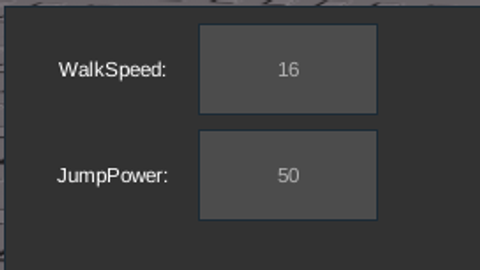
This is a simple gui that allows you to change your walkspeed and jump power, it is also draggable around your screen. Have fun!
local player = game.Players.LocalPlayer
local currentHumanoid = nil


local function updateHumanoid()
    local character = player.Character or player.CharacterAdded:Wait()
    currentHumanoid = character:WaitForChild("Humanoid")
end

local function createGui()
    local screenGui = Instance.new("ScreenGui")
    screenGui.Parent = game.CoreGui

        local frame = Instance.new("Frame")
    frame.Size = UDim2.new(0, 300, 0, 150)
    frame.Position = UDim2.new(0.5, -150, 0.5, -75)
    frame.BackgroundColor3 = Color3.fromRGB(50, 50, 50)
    frame.Parent = screenGui
    frame.Active = true
    frame.Draggable = true


        local walkSpeedLabel = Instance.new("TextLabel")
    walkSpeedLabel.Text = "WalkSpeed:"
    walkSpeedLabel.Size = UDim2.new(0, 100, 0, 50)
    walkSpeedLabel.Position = UDim2.new(0, 10, 0, 10)
    walkSpeedLabel.TextColor3 = Color3.new(1, 1, 1)
    walkSpeedLabel.BackgroundTransparency = 1
    walkSpeedLabel.Parent = frame


    local walkSpeedBox = Instance.new("TextBox")
    walkSpeedBox.PlaceholderText = tostring(currentHumanoid.WalkSpeed)
    walkSpeedBox.Size = UDim2.new(0, 100, 0, 50)
    walkSpeedBox.Position = UDim2.new(0, 110, 0, 10)
    walkSpeedBox.TextColor3 = Color3.new(1, 1, 1)
    walkSpeedBox.BackgroundColor3 = Color3.new(0.3, 0.3, 0.3)
    walkSpeedBox.Parent = frame
Comments
0Log in to join the conversation. Login
No comments yet. Be the first!