6.2k Views
920 Executions
Simple GUI
Universal Script 📌
MARV_CNC3TWFirst script
1 year ago
Please login to perform these actions:Does it work?
No reports yetNo reports yet. Tried it? Be the first to say.
Also noticed:
Description
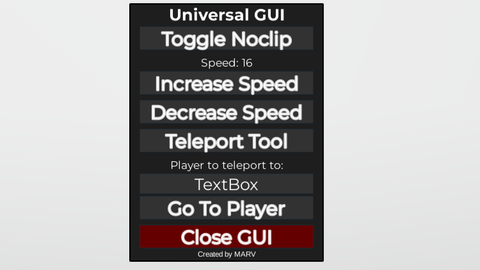
-Noclip -Increase Speed -Decrease Speed -Teleport Tool -Go to specific player //------features that will be added : ----------\\ -Better GUI -Fling all -ESP [This is my first GUI and i dont know how to make a loadstring so thats why it's overcomplicated , i will make it simple when i learn how to , i only tested it on JJsploit , Delta and Fluxus , i am not sure of it working on mobile i will add that too.]
--Universal GUI
local player = game.Players.LocalPlayer
local gui = Instance.new("ScreenGui", player:WaitForChild("PlayerGui"))
gui.Name = "MarvLuxuryGui"
gui.ResetOnSpawn = false

local frame = Instance.new("Frame", gui)
frame.Size = UDim2.new(0, 300, 0, 400)
frame.Position = UDim2.new(0.5, -150, 0.5, -200)
frame.BackgroundColor3 = Color3.fromRGB(30, 30, 30)
frame.Active = true
frame.Draggable = true

-- Animated grayscale border
local stroke = Instance.new("UIStroke", frame)
stroke.Thickness = 2
stroke.ApplyStrokeMode = Enum.ApplyStrokeMode.Border
task.spawn(function()
    local gray = 0
    local up = true
    while frame.Parent do
        stroke.Color = ColorSequence.new(Color3.fromRGB(gray, gray, gray))
        gray = up and gray + 5 or gray - 5
        if gray >= 255 then up = false end
        if gray <= 0 then up = true end
        task.wait(0.03)
    end
end)

-- Title
local title = Instance.new("TextLabel", frame)
title.Size = UDim2.new(1, 0, 0, 30)
title.BackgroundTransparency = 1
title.Text = "Universal GUI"
title.TextColor3 = Color3.new(1, 1, 1)
title.Font = Enum.Font.GothamBold
title.TextScaled = true

-- Glow effect
local function addGlow(btn)


How can you use the script
w
The script is also universal so i *ume it should work on all games on roblox.
Well first of them all , Download a roblox executor , for mobile i recommend Delta and for PC i recommend Fluxus , JJsploit and solara. After you downloaded you need to inject it , some executors like delta are automatic but some you need to do it manually. After you inject the executors go to Lua or Lua executor sometimes it's name is Execute Script , after you gone there copy the script on the website here and paste it on there after that press execute button , if my tutorial didn't help you you can go to youtube and watch some tutorials.
i forgot to put this into description , for go to player to work you must put the username in the search bar.
Ai