2.2k Views
77 Executions
Silly Hubs Aimbot
Universal Script 📌
ChilliesosillyPublished 5
1 year ago
Please login to perform these actions:Does it work?
No reports yetNo reports yet. Tried it? Be the first to say.
Also noticed:
Description
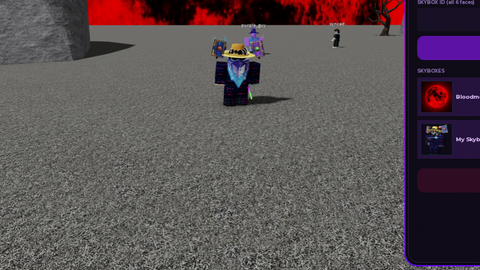
Has aimbot, esp and player editor
Updates
Script edited: Update script
-- FULL Silly GUI with ESP (boxes) + Aimbot (hard lock, centered circle) + Player tab
local Players = game:GetService("Players")
local UIS = game:GetService("UserInputService")
local RunService = game:GetService("RunService")
local LocalPlayer = Players.LocalPlayer
local PlayerGui = LocalPlayer:WaitForChild("PlayerGui")
local Workspace = workspace

local OUTLINE_COLOR = Color3.fromRGB(255,150,150)
local TITLE_COLOR = Color3.fromRGB(140,10,10)
local BG_COLOR = Color3.fromRGB(30,30,30)
local BUTTON_COLOR = Color3.fromRGB(60,10,10)

-- newFrameGui: titlebar + body. Minimize hides ONLY the body (all children inside)
local function newFrameGui(titleText, height)
    local gui = Instance.new("ScreenGui"); gui.Name = ("Silly_%s_GUI"):format(titleText:gsub("%s","")); gui.ResetOnSpawn = false; gui.Parent = PlayerGui
    local frame = Instance.new("Frame", gui); frame.AnchorPoint = Vector2.new(.5, .5); frame.Position = UDim2.new(.5, 0, .5, 0); frame.Size = UDim2.new(0, 280, 0, height or 200); frame.BackgroundColor3 = BG_COLOR; frame.BorderSizePixel = 0
    local stroke = Instance.new("UIStroke", frame); stroke.Color = OUTLINE_COLOR; stroke.Thickness = 3; Instance.new("UICorner", frame).CornerRadius = UDim.new(0, 8)

    local titleBar = Instance.new("Frame", frame); titleBar.Name = "TitleBar"; titleBar.Size = UDim2.new(1, 0, 0, 34); titleBar.BackgroundColor3 = TITLE_COLOR
    local title = Instance.new("TextLabel", titleBar); title.AnchorPoint = Vector2.new(.5, .5); title.Position = UDim2.new(.5, 0, .5, 0); title.Size = UDim2.new(.7, 0, .9, 0)
    title.BackgroundTransparency = 1; title.Text = titleText; title.Font = Enum.Font.GothamBold; title.TextSize = 16; title.TextColor3 = Color3.fromRGB(255,255,255)

    local close = Instance.new("TextButton", titleBar); close.Name = "MinimizeBtn"; close.AnchorPoint = Vector2.new(1, .5); close.Position = UDim2.new(1, -8, 0.5, 0); close.Size = UDim2.new(0, 26, 0, 26)
    close.BackgroundColor3 = Color3.fromRGB(40,10,10); close.Text = "-" ; close.Font = Enum.Font.GothamBold; close.TextSize = 16; close.TextColor3 = Color3.fromRGB(255,255,255)
    Instance.new("UICorner", close).CornerRadius = UDim.new(0, 6);

    -- Body frame where all content goes (buttons, sliders, etc)
    local body = Instance.new("Frame", frame); body.Name = "Body"; body.Size = UDim2.new(1, 0, 1, -34); body.Position = UDim2.new(0, 0, 0, 34); body.BackgroundTransparency = 1
    local list = Instance.new("UIListLayout", body); list.Padding = UDim.new(0, 10); list.HorizontalAlignment = Enum.HorizontalAlignment.Center; list.VerticalAlignment = Enum.VerticalAlignment.Top

    -- Minimize / Maximize: only affects this frame's body
    local minimized = false
    local fullSize = frame.Size
    close.MouseButton1Click:Connect(function()
        if not minimized then
            fullSize = frame.Size
            frame.Size = UDim2.new(fullSize.X.Scale, fullSize.X.Offset, 0, titleBar.Size.Y.Offset)
            body.Visible = false
            close.Text = "+"
Comments
0Log in to join the conversation. Login
No comments yet. Be the first!