111 Views
142 Executions
Script by king ATUL AND KARTIK
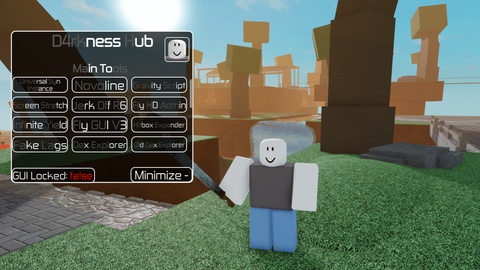
Universal Script 📌
KARTIK_GAMERZ03First script
4 months ago
Please login to perform these actions:Does it work?
No reports yetNo reports yet. Tried it? Be the first to say.
Also noticed:
Description
This a spam script and this isy first script
Updates
Script edited: Update script
-- [[ 🔑 KEY SYSTEM START ]] --
local Players = game:GetService("Players")
local CoreGui = game:GetService("CoreGui")

-- Agar pehle se Key Window khuli ho toh use delete karein
if CoreGui:FindFirstChild("KARTIKKeySystem") then CoreGui.KARTIKKeySystem:Destroy() end

local CorrectKey = "I AM NOOB 😈" -- 👈 Yahan apni marzi ki key badal sakte hain
local KeyEntered = false

-- Key GUI Banayein
local KeyGui = Instance.new("ScreenGui", CoreGui)
KeyGui.Name = "KARTIKKeySystem"

local KeyFrame = Instance.new("Frame", KeyGui)
KeyFrame.Size = UDim2.new(0, 320, 0, 160)
KeyFrame.Position = UDim2.new(0.5, -160, 0.5, -80)
KeyFrame.BackgroundColor3 = Color3.fromRGB(15, 15, 25)
KeyFrame.Active = true
Instance.new("UICorner", KeyFrame).CornerRadius = UDim.new(0, 12)

-- Border Light Effect
local KeyStroke = Instance.new("UIStroke", KeyFrame)
KeyStroke.Color = Color3.fromRGB(0, 170, 255)
KeyStroke.Thickness = 1.5

local KeyTitle = Instance.new("TextLabel", KeyFrame)
KeyTitle.Size = UDim2.new(1, 0, 0, 35)
KeyTitle.Text = "🔑 ENTER KARTIK UI KEY"
KeyTitle.TextColor3 = Color3.fromRGB(0, 170, 255)
KeyTitle.Font = Enum.Font.GothamBlack
KeyTitle.TextSize = 16
KeyTitle.BackgroundTransparency = 1

local KeyInput = Instance.new("TextBox", KeyFrame)
KeyInput.Size = UDim2.new(0, 260, 0, 35)
KeyInput.Position = UDim2.new(0.5, -130, 0.45, -17)
KeyInput.PlaceholderText = "Yahan Key Likhein..."
KeyInput.Text = ""
KeyInput.TextColor3 = Color3.new(1, 1, 1)
Comments
0Log in to join the conversation. Login
No comments yet. Be the first!