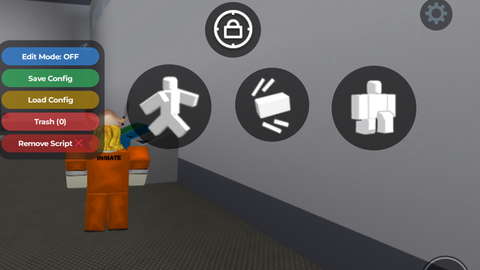
Script Move buttons

Does it work?
No reports yetNo reports yet. Tried it? Be the first to say.
Description
By claude ai What Is This? This script lets you customize any in-game UI by moving, resizing, and deleting buttons or elements wherever you want on your screen Edit Mode This is what you turn on when you want to start moving stuff around. When it says ON you are in editor mode, when it says OFF nothing can be selected or moved Save Config Once you are happy with where everything is, hit this to save your layout It saves as v1 then v2 then v3 and so on each time you save Load Config Opens a list of all your saved layouts so you can pick one to apply. You can also set any save to Auto ON which means it loads automatically every time you run the script without you needing to do anything. Trash Shows you everything you have deleted. If you deleted something by accident you can get it back from here. How To Move and Edit Buttons First turn on Edit Mode. Then tap any button or UI element in the game and it will get highlighted with a cyan outline meaning it is selected. From there you just drag it anywhere you want on screen Size+ Makes the selected element bigger each time you tap it Size - Makes the selected element smaller each time you tap it Delete Hides the element completely so it no longer shows on your screen Note📝This script may not work in some games you can modify it and tell the AI to fix it for you




signed up with script blox just so i can leave a comment this script is amazing only struggling with dragging GUI but its amazing
Its hard to modify because the script is so incredibly m*ive that my phone refuses to copy the entire thing lmao