Script Was falsely removed my "QueueSherlock" for stating there's a key system.
1

Reviewed by QueueSherlockPaid revieweron How review works
60% say it works · 5 reports in the last 2 weeks · 2 this week
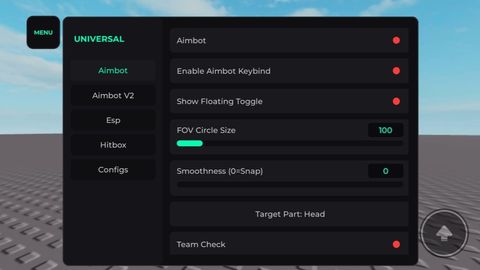
Works every game This script was falsely deleted about 2 months ago but thanks to the owner thunder mods who helped and revived this script. 1: Aimbot (V1) * Aimbot Toggle: On/Off the aimbot * Keybind Mode: For pc users * Show Floating Toggle: A Small ui for Aimbot Toggle which is draggable * Show FOV Circle: Hide/Show circle * FOV Circle Size: Circle Size Modifier * Smoothness Slider: Change How hard it will lock * Target Priority: Switch between Fov aimbot or distance aimbot (Locks onto nearest player) * Max Auto-Aim Distance: For Distance Aimbot, modifies the range in studs of nearest player has to be to lock on * Target Part Selection: Select a specefic part to lock on * Team Check: Doesnt lock on player in same team * Wall Check: Checks if player is behind something or not then when player is visible then it locks on * Enable Specific Team Aim: Searches ur game for all teams then u can select which u teams u want to lock on or not 2: Aimbot V2 (Smart Scan) * What it does: It Scans ur character and finds Targetable parts, many games customize their character models so use this if normal aimbot doesn't work. * Aimbot V2 Toggle: Same as V1 * Enable Keybind V2: Same as V1 * Show Floating Toggle: Same as V1 * Show FOV Circle V2: Same as V1 * FOV Circle Size V2: Same as V1 * Smoothness V2: Same as V1 * Target Priority V2: Same as V1 * Max Distance V2: Same as V1 * Team Check V2: Same as V1 * Wall Check V2: Same as V1 * Manual Character Scanner: Scans ur entire character model * Enable Specific Team Aim V2: Same as V1 3: ESP * Tracers: Displays Lines on ur screen which shows the players * Names: Shows players names * Chams: Highlights players * Distance (Studs): Check how far is the player * Team Check: Doesn't esp ur own team members * Max ESP Range: Range modifier for maximum in which players will be rendered by esp (in studs) * Use Team Colors: Modifies all esp features by the player team color * Team Toggles Menu: Similar to Team Specific Aimbot but in esp 4: Hitbox * Toggle Hitbox: Turn On/Off the Hitbox * Hitbox Size: Change the size of Hitbox * Hitbox Transparency: Changes transparency of Hitbox * Team Check: Does affect ur own teammates Hitbox * Enable Team Specific: Same As Team Toggle Menu or team specefic aimbot in esp and aimbot Section 5: Configs * Remove Autoload Config: Remove Config as autoloadr * Enter Config Name: Modify config name * Save Config / Overwrite Selected: Overwrite current config with ur currently active features * Load Config: Load the config (Yeah that's it) * Set As Autoload: Set ur config autoload, will automatically load ur config after u execute the script. * Delete Config: Delete ur config * Config List & Renamer Tool: Modify any Config name.
Update from CHEESE_BOY: Script Was falsely removed my "QueueSherlock" for stating there's a key system.
Update from CHEESE_BOY: Added A New Whitelist Tab: Select Specific players to whitelist then aimbot won't work on them. Added Triggerbot (For Both Aimbots) Located in Normal Aimbot Section.
Script edited: Update script
Script edited: Update script
Update from CHEESE_BOY: Status 🟢: Working
Script Was falsely removed my "QueueSherlock" for stating there's a key system.
Added A New Whitelist Tab: Select Specific players to whitelist then aimbot won't work on them. Added Triggerbot (For Both Aimbots) Located in Normal Aimbot Section.
Status 🟢: Working
loadstring(game:HttpGet("https://luafrem.pages.dev/api/loader/b7801e53990c6c494438fc243627be51?key=5e3052251391b502221806a2db04b41d2da584751cafe27b6486e568cf269d09"))()



Script hub
Hall of Fame #6 Atherhub | 25+ Games | Overpowered, Undetected, FREE

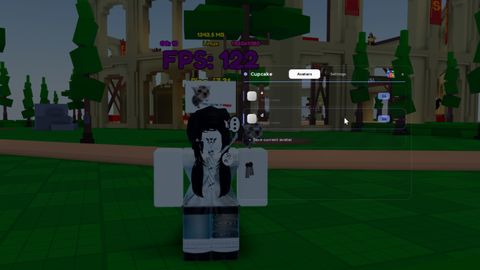
I marked it as keyless.
@ThunderMods 👍
good script
BEST... SCRIPT... EEEVVVVVEEEEEERRR!!!!!!!!!!!!1
I'm 13 and I use this aimbot script all the time best aimbot script.
@bemjayden1 thank you👍
Can you make where you can hide the fov circle?
@f65578219 Now has been added👍
how i open the cheat, what key
@hugogm2406 copy the loadstring link to your executor and paste it, that's it it's keyless, a mod menu will appear click it and it will open up the ui
w