108 Views
469 Executions
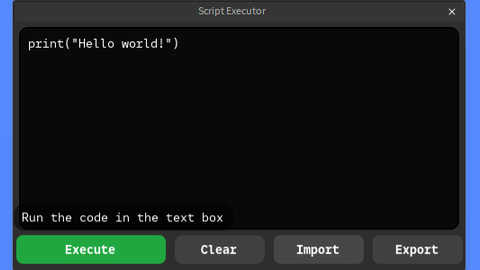
Script Executor DevForum Roblox
Universal Script 📌
MyntyPaws10K executions
3 months ago
Please login to perform these actions:Does it work?
No reports yetNo reports yet. Tried it? Be the first to say.
Also noticed:
Description
https://devforum.roblox.com/t/script-executor-simple-script-execution/3141932 DevForum Roblox
-- Services
local Players = game:GetService("Players")
local UserInputService = game:GetService("UserInputService")

local localPlayer = Players.LocalPlayer
local playerGui = localPlayer:WaitForChild("PlayerGui")

-- 1. ScreenGui Utama
local screenGui = Instance.new("ScreenGui")
screenGui.Name = "ScriptExecutorGui"
screenGui.ResetOnSpawn = false
screenGui.Parent = playerGui

-- 2. Tombol Buka/Tutup (Toggle) di Layar
local toggleButton = Instance.new("TextButton")
toggleButton.Name = "ToggleButton"
toggleButton.Size = UDim2.new(0, 110, 0, 32)
toggleButton.Position = UDim2.new(0, 10, 0, 150)
toggleButton.BackgroundColor3 = Color3.fromRGB(35, 35, 38)
toggleButton.Text = "Close Executor"
toggleButton.TextColor3 = Color3.fromRGB(255, 255, 255)
toggleButton.TextSize = 13
toggleButton.Font = Enum.Font.SourceSansBold
toggleButton.Parent = screenGui

local toggleCorner = Instance.new("UICorner")
toggleCorner.CornerRadius = UDim.new(0, 6)
toggleCorner.Parent = toggleButton

-- 3. Jendela Utama Executor (Main Frame)
local mainFrame = Instance.new("Frame")
mainFrame.Name = "MainFrame"
mainFrame.Size = UDim2.new(0, 480, 0, 270)
mainFrame.Position = UDim2.new(0.5, -240, 0.5, -135)
mainFrame.BackgroundColor3 = Color3.fromRGB(35, 35, 38)
mainFrame.BorderSizePixel = 0
mainFrame.Active = true
mainFrame.ClipsDescendants = true
mainFrame.Parent = screenGui
Comments
0Log in to join the conversation. Login
No comments yet. Be the first!