SPY-TERMINAL - KEYLESS/OPEN SOURCE
Universal Script 📌
Does it work?
No reports yetNo reports yet. Tried it? Be the first to say.
Description
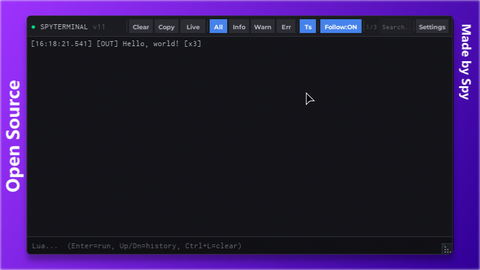
SPYTERMINAL v11 — Feature list & Changelog ========================================== FEATURE LIST (v11) ------------------ The best alternative to the Roblox native console. No more copying line by line! Select everything at once. - Text Selection (select + copy logs; view freezes when you scroll up or click into the log) - Log Interception (captures all LogService messages in real time) - Log History Pull (recent logs loaded on startup via GetLogHistory — console starts populated) - Log Dedup (consecutive identical logs collapsed with [xN] counter) - Max 800 logs / 180,000 chars (dual buffer limit, oldest entries trimmed first) - Plain-Text Logs (clean ASCII prefixes [INFO] [WARN] [ERR!] [OUT] >> ; RichText off so Ctrl+C copy stays clean) - DELETE toggle (show/hide), ESC to close (first ESC blurs a focused field, second ESC closes) - Ctrl+L clear, Ctrl+F focus search - Slide animation (slides in/out from screen edge on open/close) - Drop Shadow (3-layer soft shadow behind the console frame) - Search Bar (live filter with debounce, case-insensitive) - Filter Buttons (All, Info, Warn, Err) - Timestamp Toggle (Ts button — show/hide timestamps per line) - Log Counter (visible/total logs) - Follow / Auto-Scroll (toggle on/off; auto-disabled when you click/scroll the log, with a "↓ N new" indicator; one click resumes) - Pause Capture (Live/Paused — drops incoming external logs without closing) - Lua Eval (execute Lua in the bottom bar, Enter to run; loadstring-guarded) - Eval History (up/down navigation, up to 50 entries, no top duplicates) - Eval History Indicator (shows current index e.g. "2/12" while navigating) - Copy All (copies visible logs to clipboard) - Clear (clears all logs with green flash feedback) - Hover Tooltips (floating hint that follows the cursor on all buttons) - TopBar Dividers (visual separators between button groups) - Settings Panel (header label + position presets + font scale rows) - Position Presets (TopLeft, TopRight, BottomLeft, BottomRight, Center, Draggable) - Drag Mode (Draggable preset: drag from top bar; position restored correctly after hide/show) - Resize Handle (resizable from 320x200 to 2000x1200; size preserved after hide/show) - Console Font Scale (log font size x0.5 – x1.5) - Menu Font Scale (UI font size x0.5 – x1.5) - Title Status Dot (green=live, red=paused, yellow=not-following; version badge) - Double-Execution Guard (blocks re-run in same session; rejoin to re-execute)
Updates
Script edited: Update script V11
Script edited: Update script
--[[
    SPYTERMINAL v11 — Professional Developer Console
    Toggle : DELETE          Close : ESC
    Clear  : Ctrl+L          Search: Ctrl+F
--]]

loadstring(game:HttpGet("https://raw.githubusercontent.com/HxnryLSD/SPYMM-rblx/refs/heads/main/SPYTERMINAL.lua"))()