Rudoxxk Executor
Universal Script 📌
Does it work?
No reports yetNo reports yet. Tried it? Be the first to say.
Description
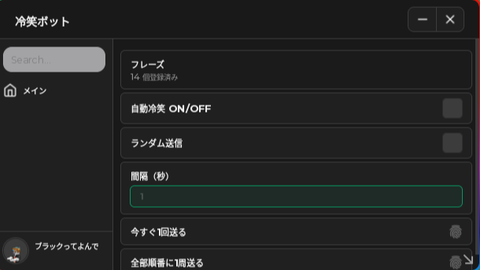
-- Script GUI Custom Berdasarkan Gambar 3249.png local ScreenGui = Instance.new("ScreenGui") local MainFrame = Instance.new("Frame") local UICorner = Instance.new("UICorner") local Title = Instance.new("TextLabel") local TextBox = Instance.new("TextBox") local UICorner2 = Instance.new("UICorner") -- Setup tempat GUI muncul (Aman untuk Exploit) local target = game:GetService("CoreGui") or game:GetService("Players").LocalPlayer:WaitForChild("PlayerGui") ScreenGui.Parent = target ScreenGui.Name = "RudoCustomExecutor" ScreenGui.ResetOnSpawn = false -- 1. Main Frame (Background Hitam Sesuai Gambar) MainFrame.Name = "MainFrame" MainFrame.Parent = ScreenGui MainFrame.BackgroundColor3 = Color3.fromRGB(15, 15, 15) -- Hitam MainFrame.Position = UDim2.new(0.3, 0, 0.3, 0) MainFrame.Size = UDim2.new(0, 480, 0, 260) MainFrame.Active = true MainFrame.Draggable = true -- Biar panelnya bisa digeser-geser dilayar UICorner.Parent = MainFrame UICorner.CornerRadius = UDim.new(0, 20) -- Sudut melengkung -- 2. Teks "BY RUDO" (Warna Hijau Terang) Title.Name = "Title" Title.Parent = MainFrame Title.BackgroundTransparency = 1 Title.Position = UDim2.new(0.52, 0, 0.1, 0) Title.Size = UDim2.new(0, 200, 0, 50) Title.Font = Enum.Font.SourceSansBold Title.Text = "BY RUDO" Title.TextColor3 = Color3.fromRGB(0, 255, 0) -- Hijau gadun/terang Title.TextSize = 40 Title.TextXAlignment = Enum.TextXAlignment.Left -- 3. Kotak Putih Tempat Ketik Script TextBox.Name = "ScriptBox" TextBox.Parent = MainFrame TextBox.BackgroundColor3 = Color3.fromRGB(245, 245, 245) -- Putih TextBox.Position = UDim2.new(0.04, 0, 0.1, 0) TextBox.Size = UDim2.new(0, 220, 0, 150) TextBox.ClearTextOnFocus = false TextBox.MultiLine = true TextBox.Text = "----remake-by-Rudooxxk\n" TextBox.TextColor3 = Color3.fromRGB(0, 0, 0) TextBox.TextSize = 14 TextBox.Font = Enum.Font.Code TextBox.TextXAlignment = Enum.TextXAlignment.Left TextBox.TextYAlignment = Enum.TextYAlignment.Top UICorner2.Parent = TextBox UICorner2.CornerRadius = UDim.new(0, 10) -- Fungsi otomatis buat bikin tombol biar rapi local function buatTombol(nama, teks, pos, size, warnaBckg, warnaTeks, ukuranTeks) local btn = Instance.new("TextButton") btn.Name = nama btn.Parent = MainFrame btn.BackgroundColor3 = warnaBckg btn.Position = pos btn.Size = size btn.Font = Enum.Font.SourceSansBold btn.Text = teks btn.TextColor3 = warnaTeks btn.TextSize = ukuranTeks local corner = Instance.new("UICorner") corner.CornerRadius = UDim.new(0, 5) corner.Parent = btn return btn end -- Warna hijau gelap untuk tombol bawah sesuai gambar 3249.png local warnaTombolHijau = Color3.fromRGB(45, 75, 45) -- 4. Membuat Tombol-Tombol local ExecBtn = buatTombol("ExecutorBtn", "executor", UDim2.new(0.04, 0, 0.75, 0), UDim2.new(0, 85, 0, 35), warnaTombolHijau, Color3.fromRGB(0,0,0), 16) local ClearBtn = buatTombol("ClearBtn", "clear", UDim2.new(0.24, 0, 0.75, 0), UDim2.new(0, 80, 0, 35), warnaTombolHijau, Color3.fromRGB(0,0,0), 16) local ResetBtn = buatTombol("ResetBtn", "Reset avatar", UDim2.new(0.43, 0, 0.75, 0), UDim2.new(0, 100, 0, 35), warnaTombolHijau, Color3.fromRGB(0,0,0), 15) -- Tombol kecil "infinite yield" di pojok kanan bawah kotak putih local InfYieldBtn = buatTombol("InfYieldBtn", "infinite yield", UDim2.new(0.34, 0, 0.62, 0), UDim2.new(0, 75, 0, 16), Color3.fromRGB(60, 60, 60), Color3.fromRGB(255, 255, 255), 10) -- ==================== FUNGSI TOMBOL ==================== -- Fungsi Tombol Execu
What do I do
ai btw