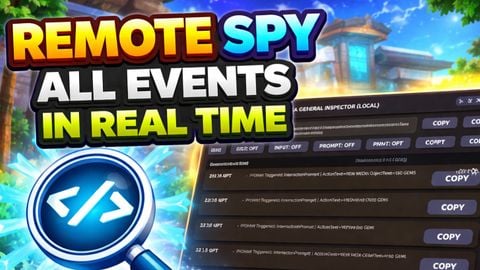
REMOTE SPY ALL EVENTS IN REAL TIME
Universal Script 📌
Does it work?
No reports yetNo reports yet. Tried it? Be the first to say.
Description
"ALT + Click Object" on PC to know what Event REMOTE SPY ALL EVENTS (Local) is a responsive, in-game Roblox debugging tool that helps you monitor and audit gameplay/UI interactions in real time from the client side. It provides a clean inspector dashboard with live logs, category filters, search, copy-per-log, export, and an ALT+Click property watcher to track how selected instances change over time. Core Features: 1) Real-time Event Logging (Client-side) The tool listens to multiple common gameplay systems and logs them instantly into a scrollable UI feed. Logged categories include: - INPUT - keyboard/mouse input begin/end events. - SPAWN - tracks when relevant instances appear in `workspace` (ex: ProximityPrompt, Sound, Model, BasePart). - PROMPT - logs when the local player triggers a `ProximityPrompt`. - SOUND - logs changes to `Sound.Playing` and records `SoundId`. - ANIM - logs played animations using `Animator.AnimationPlayed` (captures the `AnimationId` when available). - INSPECT (Property Watcher) - logs property changes from a selected instance (see section 5). 2) Newest Logs Always on Top The log feed renders in reverse order, so the newest events show at the top immediately. This makes the tool usable during fast event spam without requiring constant scrolling. 3) Search / Query Filter A search box lets you filter logs by text across: - category name - message content - instance path - instance class name Useful for quickly isolating “prompt”, “gate”, “chest”, sound IDs, animation IDs, specific object paths, etc. 4) Toggle Filters (Horizontal Scroll) The UI includes toggle buttons (ON/OFF) to show/hide categories such as: - INPUT, SPAWN, PROMPT, UI TEXT, SOUND, ANIM, GATE, CHEST, REMOTE, PATH The toggle row supports horizontal scrolling so the UI stays clean on smaller screens. 5) ALT+Click Instance Selection + Property Watcher When you ALT+Click an object, it becomes the “selected” instance and the tool starts watching property changes (where applicable), logging updates in real time. Examples of properties watched: - BasePart: Position, CFrame, Anchored, CanCollide - ProximityPrompt: Enabled, ActionText, ObjectText - Sound: Playing, SoundId - Humanoid: WalkSpeed, JumpPower, Health - UI Instances (TextLabel/TextButton/TextBox): Text, Visible - General: Name, Parent This is extremely useful for debugging: - prompts enabling/disabling - UI text changing - object movement/state changes - sound playback toggles - humanoid state changes 6) Copy Button Per Log Entry Each log row includes a COPY button that copies the log message (ex: “Triggered: …”) to clipboard using `setclipboard` if available in the runtime environment. If clipboard support isn’t available, the status line reports the limitation instead of breaking. 7) Export Logs (JSON + TXT) Export produces: - JSON export (structured: metadata + logs) - TXT export (readable)







nice script
Mobile Works????
Can't see any remote... Make my game crash when I enable some of the features
Spy on my soul, good script but make it draggable
I'll try it, I'll be back in 5