10 Views
0 Executions
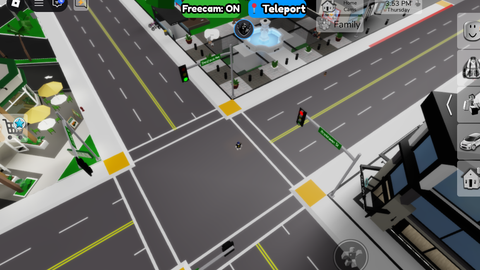
freecam
Universal Script 📌
2 days ago · Updated
Reviewed by MatttsPaid revieweron How review works
Does it work?
No reports yetNo reports yet. Tried it? Be the first to say.
Also noticed:
Description
Mobile freecam
Updates
Script edited: Update 67
local Players = game:GetService("Players")
local RunService = game:GetService("RunService")
local UserInputService = game:GetService("UserInputService")
local player = Players.LocalPlayer
local camera = workspace.CurrentCamera

local PlayerModule = require(player.PlayerScripts:WaitForChild("PlayerModule"))
local Controls = PlayerModule:GetControls()

local freecamEnabled = false
local currentPos = camera.CFrame.Position
local yaw, pitch = 0, 0
local speed = 50
local originalWalkSpeed = 16
local originalJumpPower = 50

-- Force remove any old versions of this UI so there is ONLY ONE
if player.PlayerGui:FindFirstChild("CleanFreecamUI") then
    player.PlayerGui.CleanFreecamUI:Destroy()
end

local gui = Instance.new("ScreenGui")
gui.Name = "CleanFreecamUI"
gui.ResetOnSpawn = false
gui.IgnoreGuiInset = true
gui.Parent = player:WaitForChild("PlayerGui")

-- ================= TOP BAR =================
local topBar = Instance.new("Frame")
topBar.Size = UDim2.new(0, 140, 0, 45)
topBar.Position = UDim2.new(0.5, -70, 0, 25)
topBar.BackgroundTransparency = 1
topBar.Parent = gui

-- THE ONLY BUTTON (FREECAM TOGGLE)
local camBtn = Instance.new("TextButton")
camBtn.Size = UDim2.new(1, 0, 1, 0)
camBtn.Position = UDim2.new(0, 0, 0, 0)
camBtn.BackgroundColor3 = Color3.fromRGB(180, 50, 60)
camBtn.TextColor3 = Color3.new(1, 1, 1)
Comments
0Log in to join the conversation. Login
No comments yet. Be the first!