996 Views
7.2k Executions
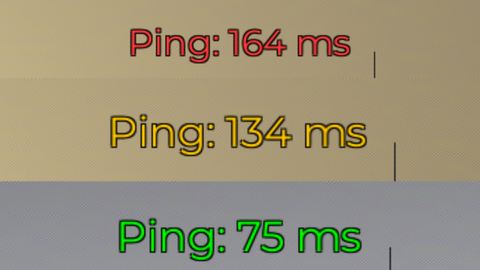
Ping viewer
Universal Script 📌
Doggggggg110K executions
4 months ago
Please login to perform these actions:Does it work?
No reports yetNo reports yet. Tried it? Be the first to say.
Also noticed:
Description
Nothing much just something simple that shows you your ping I mostly put it in my autoexecute folder
local Players = game:GetService("Players")
local LocalPlayer = Players.LocalPlayer
local CoreGui = game:GetService("CoreGui")

local UPDATE_INTERVAL = 0.5
local floor = math.floor

-- pre-computed colors
local GREEN  = Color3.fromRGB(0, 255, 0)
local YELLOW = Color3.fromRGB(255, 200, 0)
local RED    = Color3.fromRGB(255, 60, 60)
local GRAY   = Color3.fromRGB(180, 180, 180)

-- destroy old instance on re-execution
local old = CoreGui:FindFirstChild("PingDisplay")
if old then old:Destroy() end

local gui = Instance.new("ScreenGui")
gui.Name = "PingDisplay"
gui.ResetOnSpawn = false
gui.IgnoreGuiInset = true
gui.ZIndexBehavior = Enum.ZIndexBehavior.Sibling
gui.Parent = CoreGui

local label = Instance.new("TextLabel")
label.Name = "PingLabel"
label.BackgroundTransparency = 1
label.AnchorPoint = Vector2.new(1, 0)
label.Position = UDim2.new(1, -8, 0, 8)
label.Size = UDim2.fromOffset(140, 20)
label.Font = Enum.Font.Gotham
label.TextSize = 14
label.TextXAlignment = Enum.TextXAlignment.Right
label.TextYAlignment = Enum.TextYAlignment.Top
label.TextColor3 = GRAY
label.TextStrokeTransparency = 0
label.Text = "Ping: -- ms"
label.Parent = gui

local function colorForPing(ms)
Comments
0Log in to join the conversation. Login
No comments yet. Be the first!