471 Views
24 Executions
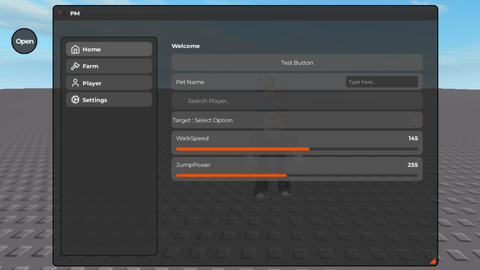
PMS Ui library
Universal Script 📌
8 months ago · Updated
Reviewed by MatttsPaid revieweron How review works
Does it work?
No reports yetNo reports yet. Tried it? Be the first to say.
Also noticed:
Description
Ui library
Updates
Script edited: Update script
Script edited: Update script
Script edited: Update script
Script edited: Update script
Script edited: Update script
local LIBRARY_URL = 'https://github.com/PMLOLHUB/Ui-library/raw/refs/heads/main/UI%20PMS'
local Library = loadstring(game:HttpGet(LIBRARY_URL, true))()

local Window = Library:CreateWindow('PMS UI Test', {
    DisplayOrder = 999,
})

local MainTab = Window:CreateCategory('Main', 'lucide-home')
local MyTab = Window:CreateCategory('ESP', 'lucide-eye')

MyTab:CreateColorPicker('ESP Color', 'lucide-palette', Color3.fromRGB(255, 0, 0), function(newColor)
    ESPColor = newColor
end)

MainTab:CreateLabel('UI Library Test - Successfully Loaded', 'lucide-check-circle')

MainTab:CreateButton('Test Button', 'lucide-mouse-pointer-click', nil, function()
    print('[Test] Button Clicked')
end)

MainTab:CreateToggle('Enable Auto Farm', 'lucide-bot', false, 'AutoFarm', function(value)
    print('[Test] AutoFarm =', value)
end)

MainTab:CreateSlider('Speed', 'lucide-gauge', 1, 100, 50, 'Speed', function(value)
    print('[Test] Speed =', value)
end)

MainTab:CreateDropdown('Select Mode', 'lucide-list', {'Easy', 'Normal', 'Hard'}, 'Normal', 'GameMode', function(value)
    print('[Test] GameMode =', value)
end)

MainTab:CreateTextbox('Player Name', 'lucide-user', 'Enter player name...', 'PlayerName', function(value)
    print('[Test] PlayerName =', value)
end)

MainTab:CreateNumberTextbox('Starting Cash', 'lucide-banknote', 100, 'StartCash', function(value)
    print('[Test] StartCash =', value)
end)
Comments
0Log in to join the conversation. Login
No comments yet. Be the first!