305 Views
92 Executions
Notes script
Universal Script 📌
Yzn_lol10K executions
10 months ago
Please login to perform these actions:Does it work?
No reports yetNo reports yet. Tried it? Be the first to say.
Also noticed:
Description
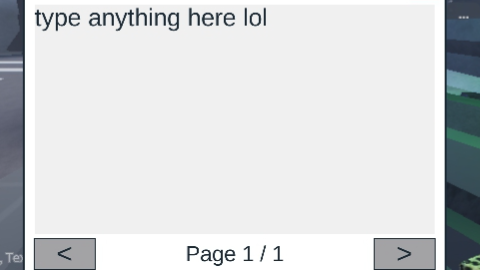
Type anything you want on it I don't know what to name this script
-- Services
local Players = game:GetService("Players")
local UIS = game:GetService("UserInputService")
local player = Players.LocalPlayer

-- ScreenGui
local gui = Instance.new("ScreenGui")
gui.Name = "BookGui"
gui.ResetOnSpawn = false
gui.Parent = player:WaitForChild("PlayerGui")

-- 📕 Book Button
local bookButton = Instance.new("TextButton")
bookButton.Size = UDim2.new(0, 60, 0, 60)
bookButton.Position = UDim2.new(0, 20, 0.5, -30)
bookButton.Text = "📕"
bookButton.TextSize = 36
bookButton.BackgroundColor3 = Color3.fromRGB(200, 200, 200)
bookButton.BorderSizePixel = 0
bookButton.Parent = gui

-- Book Frame
local bookFrame = Instance.new("Frame")
bookFrame.Size = UDim2.new(0, 420, 0, 320)
bookFrame.Position = UDim2.new(0.5, -210, 0.5, -160)
bookFrame.BackgroundColor3 = Color3.fromRGB(255, 255, 255)
bookFrame.Visible = false
bookFrame.Parent = gui
bookFrame.BorderSizePixel = 2

-- Top Bar
local topBar = Instance.new("Frame")
topBar.Size = UDim2.new(1, 0, 0, 35)
topBar.BackgroundColor3 = Color3.fromRGB(230, 230, 230)
topBar.Parent = bookFrame
topBar.BorderSizePixel = 0

-- Close Button
local closeButton = Instance.new("TextButton")
closeButton.Size = UDim2.new(0, 30, 0, 30)
Comments
0Log in to join the conversation. Login
No comments yet. Be the first!