1.1k Views
338 Executions
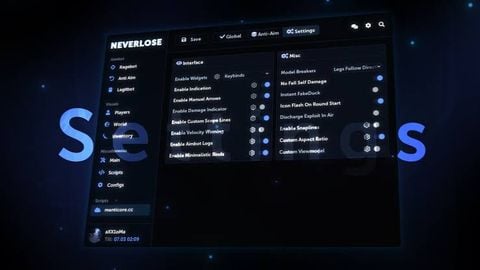
Neverlose [UI Library]
Universal Script 📌
3 weeks ago
Reviewed by QueueSpeedDemonPaid revieweron How review works
Does it work?
Early reports100% say it works · 2 reports in the last 2 weeks
Also noticed:
Description
Source: https://script.roscripts.io/Ci0HsqM Documentation: https://script.roscripts.io/SSnnbY5
repeat task.wait() until game:IsLoaded()

local success, NeverloseUI = pcall(function()
    return loadstring(game:HttpGet("https://script.roscripts.io/Ci0HsqM"))()
end)

if not success or not NeverloseUI then
    warn("Failed to load NeverloseUI.")
    return
end

local Window
local function SafeCall(callback)
    local ok, result = pcall(callback)
    if not ok then
        warn("[NeverloseUI] " .. tostring(result))
    end
    return ok, result
end

SafeCall(function()
    NeverloseUI:AddTheme({
        Name = "Ocean Blue",
        Accent = Color3.fromRGB(55, 145, 255),
        Background = Color3.fromRGB(18, 21, 29),
        Secondary = Color3.fromRGB(25, 30, 42),
        Text = Color3.fromRGB(235, 242, 255),
        Border = Color3.fromRGB(45, 65, 95)
    })
end)

local created, result = SafeCall(function()
    return NeverloseUI:CreateWindow({
        Title = "Example Hub",
        Subtitle = "Blue Edition",
        Theme = "Ocean Blue",
        ToggleKeybind = Enum.KeyCode.RightShift,
        ConfigEnabled = true,
        AutoSave = true,
        AutoLoad = true,



you cannot call it source when its literally obfuscated btw
Why obfuscated? You're manipulating us TO Think your script is "source", apparently not.