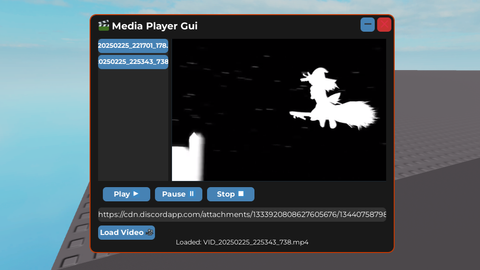
MediaPlayer Gui MP4
Universal Script 📌
Does it work?
No reports yetNo reports yet. Tried it? Be the first to say.
Description
MediaPlayer Gui (Only supported 'https://cdn.discordapp.com/attachments/') Steps to get the videoUrl: - Open discord. - Upload the video you want ('.mp4'). - Once the video uploaded, hold/right click the video & click at 'Copy Media Link'/'Copy Link'. - Then paste it into the MediaPlayer Gui. (Sometimes, the videoUrl copied is not '.mp4', so you need play it on your device to check, is it showing video '.mp4' or not showing but only audio '.mp3 but saved as .mp4') (The saving process are very slow & will lag your device) (it takes some times to load the video into the playlist) (If you delete your video file, make sure to click the button that you deleted in the MediaPlayer Gui, so it will removed the button too) (The playlist are empty when you execute the script, so you need to upload your own videoUrl, the video saved in the local storage (folder: "MediaPlayer")) Feel Free to use it, Open Source.

fix this - mediaplayer folder / file is not appearing in work*e > executor or any - make the gui dragable cuz it's too big Ty
W script.