3.5k Views
218 Executions

Does it work?
No reports yetNo reports yet. Tried it? Be the first to say.
Also noticed:
Description
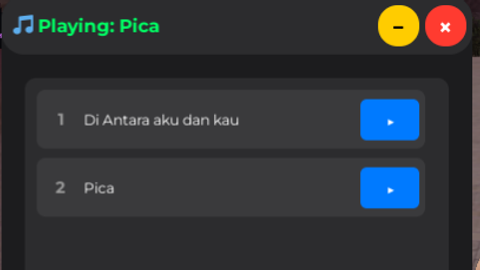
Media players other than those using boombox tools How to Use Open YouTube -> go to YT Convert to mp3 -> Download the file -> Upload it to GitHub -> get the Raw link -> Then edit (The mp3 file will go to the executor workspace)
-- Create ScreenGui
local screenGui = Instance.new("ScreenGui")
screenGui.Name = "AudioPlayerGUI"
screenGui.ResetOnSpawn = false
screenGui.Parent = game.Players.LocalPlayer:WaitForChild("PlayerGui")

-- Main Frame (iOS style)
local mainFrame = Instance.new("Frame")
mainFrame.Name = "MainFrame"
mainFrame.Size = UDim2.new(0, 400, 0, 450)
mainFrame.Position = UDim2.new(0.5, -200, 0.5, -225)
mainFrame.BackgroundColor3 = Color3.fromRGB(28, 28, 30)
mainFrame.BorderSizePixel = 0
mainFrame.ClipsDescendants = true
mainFrame.Parent = screenGui

-- Add rounded corners
local corner = Instance.new("UICorner")
corner.CornerRadius = UDim.new(0, 20)
corner.Parent = mainFrame

-- Title Bar
local titleBar = Instance.new("Frame")
titleBar.Name = "TitleBar"
titleBar.Size = UDim2.new(1, 0, 0, 50)
titleBar.BackgroundColor3 = Color3.fromRGB(44, 44, 46)
titleBar.BorderSizePixel = 0
titleBar.Parent = mainFrame

local titleCorner = Instance.new("UICorner")
titleCorner.CornerRadius = UDim.new(0, 20)
titleCorner.Parent = titleBar

-- Title Label
local titleLabel = Instance.new("TextLabel")
titleLabel.Size = UDim2.new(1, -100, 1, 0)
titleLabel.Position = UDim2.new(0, 10, 0, 0)
titleLabel.BackgroundTransparency = 1
titleLabel.Text = "🎵 Now Playing"
titleLabel.TextColor3 = Color3.fromRGB(255, 255, 255)

alot of work just for a media player
gemini ahh script
beneran work ga