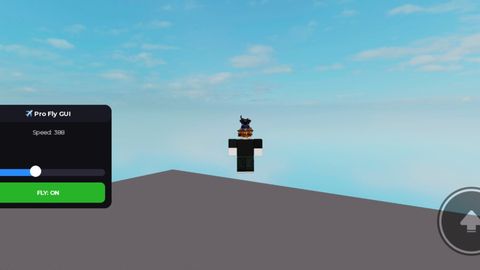
[MOBILE] Pro Fly GUI | Camera-Relative, 1-1000 Speed Slider

Reviewed by ThunderModsScriptBlox staffon How review works
Does it work?
No reports yetNo reports yet. Tried it? Be the first to say.
Description
🔥 Introducing the most advanced and smooth **Mobile Fly GUI** designed specifically for mobile and tablet users. ### ✨ Features: * **Camera-Relative Flight:** Your character smoothly follows your exact 3D camera angles (look up to fly up, look down to fly down). * **Smooth Speed Slider:** Fully adjustable speed ranging from 10 to 1000 for ultimate control! * **Anti-Gravity Fix:** Stays perfectly locked in place mid-air when idle—no sliding or falling down. * **Mobile-Friendly UI:** Clean, modern, and fully draggable panel that won't clutter your screen. * **Universal Support:** Works seamlessly across most Roblox games and executors. --- If you like it, don't forget to leave an upvote/star! ⭐ Enjoy!
-- Mobile 3D Camera Fly (Sıfır -- Mobile 3D Camera Fly (English UI - Max 1000 Speed & Anti-Gravity)
local Players = game:GetService("Players")
local RunService = game:GetService("RunService")
local UserInputService = game:GetService("UserInputService")
local player = Players.LocalPlayer
local playerGui = player:WaitForChild("PlayerGui")

-- Eski GUI'yi temizle
if playerGui:FindFirstChild("SpikeProFly") then
    playerGui.SpikeProFly:Destroy()
end

-- Ana Ekran Çerçevesi
local screenGui = Instance.new("ScreenGui")
screenGui.Name = "SpikeProFly"
screenGui.ResetOnSpawn = false
screenGui.DisplayOrder = 999
screenGui.Parent = playerGui

local frame = Instance.new("Frame")
frame.Name = "FlyPanel"
frame.Size = UDim2.new(0, 220, 0, 180)
frame.Position = UDim2.new(0.05, 0, 0.35, 0)
frame.BackgroundColor3 = Color3.fromRGB(15, 15, 20)
frame.BorderSizePixel = 0
frame.Active = true
frame.Draggable = true
frame.Parent = screenGui

local uiCorner = Instance.new("UICorner")
uiCorner.CornerRadius = UDim.new(0, 12)
uiCorner.Parent = frame

local title = Instance.new("TextLabel")
title.Size = UDim2.new(1, 0, 0, 30)
title.BackgroundColor3 = Color3.fromRGB(25, 25, 35)
title.TextColor3 = Color3.fromRGB(255, 255, 255)
title.TextSize = 13
title.Font = Enum.Font.GothamBold
title.Text = "✈️ Pro Fly GUI"









i mean good script gng but why are you parenting the gui to PlayerGui?
@ZeroPoint ıdk its my first script ı cant make good script sorry if its bad