74.9k Views
59 Executions


Does it work?
No reports yetNo reports yet. Tried it? Be the first to say.
Also noticed:
Description
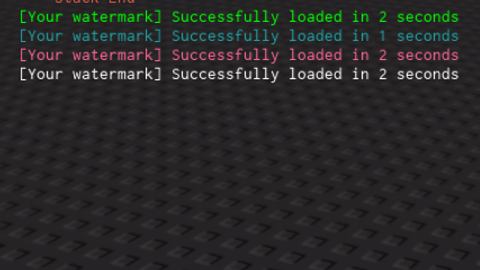
Using my "Change output color module" you can achieve a similar loading like Luarmor. Now note that this is only a fake loading with just repeats 50 times and takes the interger times 2 to minimize the loading symbol and make it clean. How to use it? Modules.LoadingBar("Your watermark","Color of choice from the color table that will be changed into once the loading is completed",wait time between every symbol, your symbol of choice)
local Modules = {
    Colors =  {
        ["Green"] = "0,255,0",
        ["Cyan"] = "33, 161, 163",
        ["White"] = "255,255,255",
		["Pink"] = "255, 102, 153",
    },
    Services = {
        RunService = game:GetService("RunService"),
        CoreGui = game:GetService("CoreGui")
    }
}

Modules.ChangeColor = function()
    local Loop;
    Loop = Modules.Services.RunService.Heartbeat:Connect(function()
        local success,err = pcall(function()
            for index,label in pairs(Modules.Services.CoreGui:FindFirstChild("DevConsoleMaster"):GetDescendants()) do
                if label:IsA("TextLabel") then
                    label.RichText = true
                end
            end
        end)

        if not success then
            warn(`A error occured {err}`)
            Loop:Disconnect()
        end
    end)
end

Modules.LoadingBar = function(watermark,color, delay,loadingsymbol)
    delay = delay or 0.1

    local Text = watermark..tostring(math.random(500,20000))

    print(Text)

    local loadingLabel = nil
    local progress = ""






pretty neat
Ok
@vxsty oops idk why I did a %s for a number 😭 Updated now
%s for a number 😭 this code is so hillarious