43 Views
2 Executions
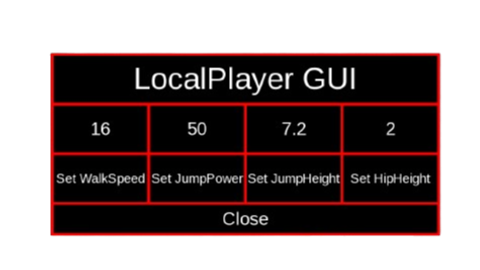
LocalPlayer GUI
Universal Script 📌
3 days ago · Updated
Reviewed by QueueSherlockPaid revieweron How review works
Does it work?
No reports yetNo reports yet. Tried it? Be the first to say.
Also noticed:
Description
This is definitely useless since there's admin scripts like infinite yeild but if you like scripts from people who just learning coding a little bit, you can try this if you want! and this is my first script ever that isn't AI generated but i got some bug while i was creating this script do i asked AI why, i fixed the issues myself by the way.
local Players = game:GetService("Players")
local Player = Players.LocalPlayer
local Character = Player.Character
local Humanoid = Character:WaitForChild("Humanoid")
local PlayerGui = Player.PlayerGui
local Red = Color3.fromRGB(255, 0, 0)
local White = Color3.fromRGB(255, 255, 255)
local Black = Color3.fromRGB(0, 0, 0)

local gui = Instance.new("ScreenGui")
gui.Name = "GUI"
gui.ResetOnSpawn = false
gui.Parent = PlayerGui

local frame = Instance.new("Frame")
frame.Active = true
frame.BackgroundColor3 = Black
frame.BorderColor3 = Red
frame.BorderSizePixel = 3
frame.Draggable = true
frame.Position = UDim2.new(0.225, 0, 0.05, 0)
frame.Size = UDim2.new(0, 409, 0, 189)
frame.Parent = gui

local sframe = Instance.new("ScrollingFrame")
sframe.BackgroundColor3 = Black
sframe.BorderColor3 = Red
sframe.BorderSizePixel = 3
sframe.Position = UDim2.new(0, 0, 0, 53)
sframe.Size = UDim2.new(0, 409, 0, 103)
sframe.Visible = false
sframe.Parent = frame

local rtextbox = Instance.new("TextBox")
rtextbox.BackgroundColor3 = Black
rtextbox.BorderColor3 = Red
rtextbox.BorderSizePixel = 3
rtextbox.Font = Enum.Font.Legacy
rtextbox.Position = UDim2.new(0, 153, 0, 0)
rtextbox.Size = UDim2.new(0, 50, 0, 50)
Comments
0Log in to join the conversation. Login
No comments yet. Be the first!