14 Views
3 Executions
Lite c00lkidd script change sky and theme brick
Universal Script 📌
2 days ago · Updated
Reviewed by QueueSpeedDemonPaid revieweron How review works
Does it work?
No reports yetNo reports yet. Tried it? Be the first to say.
Also noticed:
Description
generation by AI :33
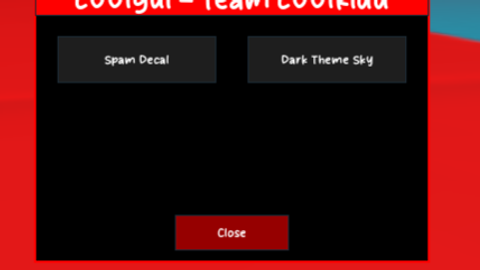
-- c00lgui / c00lkidd Retro Style GUI (Remake cho các Executor hiện đại)
local CoreGui = game:GetService("CoreGui")
local Players = game:GetService("Players")
local LocalPlayer = Players.LocalPlayer

-- Xóa GUI cũ nếu có
if CoreGui:FindFirstChild("c00lgui_remake") then
    CoreGui:FindFirstChild("c00lgui_remake"):Destroy()
end

local ScreenGui = Instance.new("ScreenGui")
ScreenGui.Name = "c00lgui_remake"
ScreenGui.Parent = CoreGui

local MainFrame = Instance.new("Frame")
MainFrame.Size = UDim2.new(0, 350, 0, 250)
MainFrame.Position = UDim2.new(0.5, -175, 0.5, -125)
MainFrame.BackgroundColor3 = Color3.fromRGB(0, 0, 0)
MainFrame.BorderColor3 = Color3.fromRGB(255, 0, 0)
MainFrame.BorderSizePixel = 2
MainFrame.Active = true
MainFrame.Draggable = true
MainFrame.Parent = ScreenGui

-- Tiêu đề
local Title = Instance.new("TextLabel")
Title.Size = UDim2.new(1, 0, 0, 30)
Title.BackgroundColor3 = Color3.fromRGB(255, 0, 0)
Title.TextColor3 = Color3.fromRGB(255, 255, 255)
Title.Text = "c00lgui - Team c00lkidd"
Title.TextScaled = true
Title.Font = Enum.Font.SourceSansBold
Title.Parent = MainFrame

-- Nút chức năng 1: Spam Decal (Huyền thoại c00lkidd)
local BtnDecal = Instance.new("TextButton")
BtnDecal.Size = UDim2.new(0, 140, 0, 40)
BtnDecal.Position = UDim2.new(0, 20, 0, 50)
BtnDecal.BackgroundColor3 = Color3.fromRGB(30, 30, 30)
BtnDecal.TextColor3 = Color3.fromRGB(255, 255, 255)
Comments
0Log in to join the conversation. Login
No comments yet. Be the first!