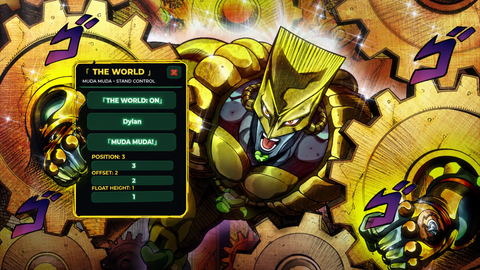
JoJo Stand Script-[THE WORLD]
Universal Script 📌
Reviewed by QueueSherlockPaid revieweron How review works
Does it work?
No reports yetNo reports yet. Tried it? Be the first to say.
Description
⭐ JoJo Stand Controller — THE WORLD -pls give honest opinion about this script so i know what to fix/add- -PLS READ- WORKING ON MAKING EACH SCIPT HAVE DIFF MOVE & IDLE ANIMATION I JUST DONT KNOW HOW Original script by [**GuestEZQ**](https://scriptblox.com/u/GuestEZQ) This version has been tweaked and modified by me. All credit for the original script goes to GuestEZQ. A JoJo-inspired **The World Stand Controller** with target following, blocking, vanish/summon, barrage, animations, sounds, and a **DIO / The World-themed GUI**. ### 🎮 How to Use 1. Execute the script. 2. Enter the **target player's name** in the Target Name box. 3. Press **The World: OFF** to activate The World. 4. The World will automatically follow the selected player. ### 💬 Chat Commands Type these commands in chat: * `SUMMON` — Summons/activates The World. * `VANISH` — Sends your character high into the sky while your camera follows the target. * `SUMMON` — Returns your character to its original position after using `VANISH`. * `BARRAGE` — Performs the **MUDA MUDA!** barrage attack. * `BLOCK` — Moves The World in front of the target. * `UNBLOCK` — Stops blocking. ### 👊 MUDA MUDA! Barrage Use the **「 MUDA MUDA! 」** button in the GUI to perform the attack. Includes: * Punch animation * **MUDA! MUDA! MUDA!** voice line * Punch sound effects * Fling effect * Temporary color effect ### ⚙️ GUI Settings * **Position** — Controls how far behind the target The World stays. * **Offset** — Moves The World left/right. * **Float Height** — Controls The World's height. * **GUI** — Hides/shows the controller. * The GUI can be **dragged around the screen**. ### 🕴️ The World Animations The World automatically switches between an idle levitation animation and a movement animation depending on whether the target is moving. ### 🔧 Extra Press **N** to toggle the included noclip feature — useful for getting through places with thick walls. ### 📜 Credits **Original Script:** [**GuestEZQ**](https://scriptblox.com/u/GuestEZQ) **Current version:** Tweaked/modified version of GuestEZQ's script. Please give credit to **GuestEZQ** for the original work
local Players = game:GetService("Players")
local RunService = game:GetService("RunService")
local Debris = game:GetService("Debris")
local UserInputService = game:GetService("UserInputService")
local TextChatService = game:GetService("TextChatService")

local function SendChatMessage(message)
    if TextChatService.ChatVersion == Enum.ChatVersion.TextChatService then
        local textChannel = TextChatService.TextChannels:FindFirstChild("RBXGeneral")
        if textChannel then
            textChannel:SendAsync(message)
        end
    else
        game:GetService("ReplicatedStorage").DefaultChatSystemChatEvents.SayMessageRequest:FireServer(message, "All")
    end
end

local player = Players.LocalPlayer

local function GetNearestPlayerInFront(targetPlayer, maxAngle)
    maxAngle = maxAngle or 60

    if not targetPlayer.Character then return nil end
    local targetHRP = targetPlayer.Character:FindFirstChild("HumanoidRootPart")
    if not targetHRP then return nil end

    local targetLook = targetHRP.CFrame.LookVector

    local closest = nil
    local closestDist = math.huge

    for _, p in pairs(Players:GetPlayers()) do
        if p ~= player and p ~= targetPlayer and p.Character then
            local hrp = p.Character:FindFirstChild("HumanoidRootPart")
            if hrp then
                local difference = hrp.Position - targetHRP.Position

                if difference.Magnitude > 0 then
                    local vec = difference.Unit
                    local dot = math.clamp(targetLook:Dot(vec), -1, 1)








