813 Views
6.1k Executions
FE Outfit Changer OPEN SOURCE
Universal Script 📌
PickelkingkongFirst script
4 months ago
Please login to perform these actions:Does it work?
No reports yetNo reports yet. Tried it? Be the first to say.
Also noticed:
Description
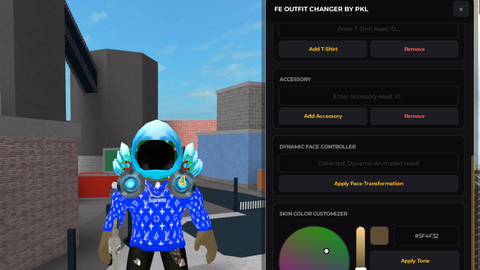
You can change your shirt, pants, or t-shirt, add multiple accessories, delete accessories, and change your skin color. You can also save your new outfit on death. To go back to your original avatar, simply click 'Restore Server-Sided Default Outfit'. Additionally, this GUI is draggable.
-- Ensure old UI is removed cleanly
local CoreGui = game:GetService("CoreGui")
if CoreGui:FindFirstChild("OutfitChangerGUI") then
    CoreGui.OutfitChangerGUI:Destroy()
end

-- Create Main ScreenGui
local OutfitChangerGUI = Instance.new("ScreenGui")
OutfitChangerGUI.Name = "OutfitChangerGUI"
OutfitChangerGUI.Parent = CoreGui
OutfitChangerGUI.ResetOnSpawn = false

-- Premium Minimalist Palette
local THEME = {
    Background = Color3.fromRGB(18, 18, 22),
    Header = Color3.fromRGB(12, 12, 15),
    Accent = Color3.fromRGB(242, 185, 34),     -- Vivid Gold
    AccentDim = Color3.fromRGB(165, 125, 23),
    Text = Color3.fromRGB(255, 255, 255),
    TextDim = Color3.fromRGB(140, 140, 150),
    Button = Color3.fromRGB(28, 28, 34),
    ButtonHover = Color3.fromRGB(36, 36, 44),
    Input = Color3.fromRGB(10, 10, 12),
    Border = Color3.fromRGB(35, 35, 42),
    Success = Color3.fromRGB(46, 204, 113)
}

-- Services
local TweenService = game:GetService("TweenService")
local UserInputService = game:GetService("UserInputService")
local Players = game:GetService("Players")
local LocalPlayer = Players.LocalPlayer

local T_FAST = TweenInfo.new(0.2, Enum.EasingStyle.Quad, Enum.EasingDirection.Out)
local T_BOUNCE = TweenInfo.new(0.3, Enum.EasingStyle.Back, Enum.EasingDirection.Out)

-- Global Automation Settings & Originals Tracking Map
local SaveOnDeathEnabled = false
local LastCustomOutfit = {
    Shirt = nil,
Comments
0Log in to join the conversation. Login
No comments yet. Be the first!







