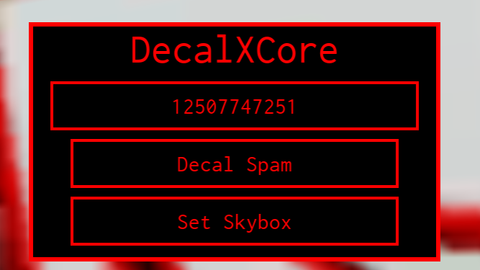
DecalXCore Visual
Universal Script 📌
Does it work?
No reports yetNo reports yet. Tried it? Be the first to say.
Description
DecalXCore is a c00lkidd-themed utility GUI designed to apply decals across the entire game world. By entering an asset ID into the textbox and pressing “Decal Spam”, the script will automatically cover every part, model, and surface with the chosen decal. It also extends support to MeshParts, SpecialMeshes, and older Mesh objects, ensuring textures are replaced consistently across all assets. The second feature is “Set Skybox”, which replaces the game’s entire sky with the given asset ID. This allows you to instantly transform the game’s atmosphere to match your chosen image. The interface follows a minimal, black-and-red c00lkidd style with sharp edges, no rounded corners, and is draggable for convenience. Text size is uniform, making the GUI both professional and visually striking.
-- DecalXCore - c00lkidd-style Decal & Skybox GUI (compact version)
-- Theme: black, red outline, no UICorner, draggable. Parent: CoreGui

local Players = game:GetService("Players")
local Lighting = game:GetService("Lighting")
local LocalPlayer = Players.LocalPlayer

--=== UI ===--
local gui = Instance.new("ScreenGui")
gui.Name = "DecalXCore"
gui.ResetOnSpawn = false
gui.Parent = game:GetService("CoreGui")

local frame = Instance.new("Frame")
frame.Size = UDim2.new(0, 240, 0, 150) -- smaller frame
frame.Position = UDim2.new(0.5, -120, 0.5, -75)
frame.BackgroundColor3 = Color3.fromRGB(0, 0, 0)
frame.BorderColor3 = Color3.fromRGB(255, 0, 0)
frame.BorderSizePixel = 3
frame.Active = true
frame.Draggable = true
frame.Parent = gui

local title = Instance.new("TextLabel")
title.Parent = frame
title.Size = UDim2.new(1, 0, 0, 26) -- smaller title
title.Position = UDim2.new(0, 0, 0, 0)
title.BackgroundTransparency = 1
title.Text = "DecalXCore"
title.TextColor3 = Color3.fromRGB(255, 0, 0)
title.Font = Enum.Font.Code
title.TextScaled = false
title.TextSize = 18

-- Input
local decalBox = Instance.new("TextBox")
decalBox.Parent = frame
decalBox.Size = UDim2.new(1, -20, 0, 28) -- smaller input box
decalBox.Position = UDim2.new(0, 10, 0, 34)
decalBox.BackgroundColor3 = Color3.fromRGB(0, 0, 0)

coment alor l'executer
Ele é visual mesmo?
The Script May Not Work If It Executed Directly On Your Executor