1.5k Views
497 Executions
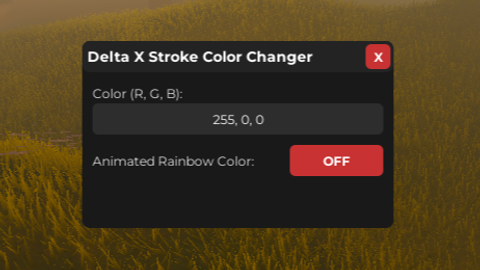
DELTA X STROKE COLOR CHANGER GUI
Universal Script 📌
1 year ago
Please login to perform these actions:Does it work?
No reports yetNo reports yet. Tried it? Be the first to say.
Also noticed:
Description
DELTA X STROKE COLOR CHANGER GUI by me (Original script by @Games1799_official) NOT TEST YET BECAUSE I'M ON PC & I DON'T HAVE DELTA.. ANYONE PLEASE TEST IT & TELL ME IF THIS WORKING OR NOT :D
local RunService = game:GetService("RunService")
local UserInputService = game:GetService("UserInputService")
local CoreGui = game:GetService("CoreGui")

local screenGui = Instance.new("ScreenGui")
screenGui.Name = "DeltaXStrokeChangerGui"
screenGui.ResetOnSpawn = false
screenGui.Parent = CoreGui

local mainFrame = Instance.new("Frame")
mainFrame.Name = "MainFrame"
mainFrame.Size = UDim2.new(0, 300, 0, 180)
mainFrame.Position = UDim2.new(0.5, -150, 0.5, -90)
mainFrame.BackgroundColor3 = Color3.fromRGB(25, 25, 25)
mainFrame.BorderColor3 = Color3.fromRGB(50, 50, 50)
mainFrame.BorderSizePixel = 2
mainFrame.Active = true
mainFrame.Draggable = true
mainFrame.Visible = false
mainFrame.Parent = screenGui

local corner = Instance.new("UICorner", mainFrame)
corner.CornerRadius = UDim.new(0, 8)

local titleBar = Instance.new("Frame")
titleBar.Name = "TitleBar"
titleBar.Size = UDim2.new(1, 0, 0, 30)
titleBar.BackgroundColor3 = Color3.fromRGB(35, 35, 35)
titleBar.Parent = mainFrame

local titleCorner = Instance.new("UICorner", titleBar)
titleCorner.CornerRadius = UDim.new(0, 8)

local titleLabel = Instance.new("TextLabel")
titleLabel.Name = "TitleLabel"
titleLabel.Size = UDim2.new(1, -35, 1, 0)
titleLabel.Position = UDim2.new(0, 5, 0, 0)
titleLabel.BackgroundTransparency = 1
titleLabel.Text = "Delta X Stroke Color Changer"
titleLabel.Font = Enum.Font.GothamBold
Comments
0Log in to join the conversation. Login
No comments yet. Be the first!