16.4k Views
4.5k Executions
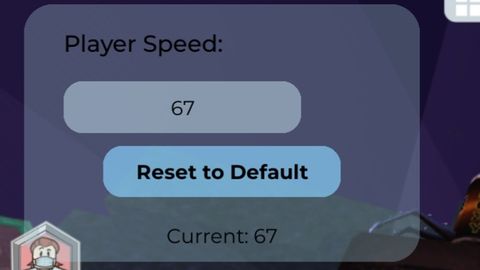
Custom speed
Universal Script 📌
ZHEKA22K10K executions
1 year ago
Please login to perform these actions:Does it work?
No reports yetNo reports yet. Tried it? Be the first to say.
Also noticed:
Description
Player can make custom speed! DIX SEVEN.
local Player = game:GetService("Players").LocalPlayer
local Character = Player.Character or Player.CharacterAdded:Wait()
local Humanoid = Character:WaitForChild("Humanoid")
local TweenService = game:GetService("TweenService")

-- Create GUI with rounded corners
local ScreenGui = Instance.new("ScreenGui")
local Frame = Instance.new("Frame")
local UICorner = Instance.new("UICorner")
local SpeedLabel = Instance.new("TextLabel")
local SpeedTextBox = Instance.new("TextBox")
local TextBoxCorner = Instance.new("UICorner")
local ResetButton = Instance.new("TextButton")
local ResetButtonCorner = Instance.new("UICorner")
local CurrentSpeedLabel = Instance.new("TextLabel")

-- ScreenGui setup
ScreenGui.Name = "SpeedControlGUI"
ScreenGui.Parent = Player.PlayerGui
ScreenGui.ResetOnSpawn = false

-- Main Frame with rounded corners and transparency
Frame.Name = "MainFrame"
Frame.Parent = ScreenGui
Frame.Size = UDim2.new(0, 200, 0, 130)
Frame.Position = UDim2.new(0, 10, 0, 10)
Frame.BackgroundColor3 = Color3.fromRGB(173, 216, 230) -- Light blue
Frame.BackgroundTransparency = 0.7 -- 30% opacity
Frame.BorderSizePixel = 0
Frame.Active = true
Frame.Draggable = true

UICorner.CornerRadius = UDim.new(0, 15)
UICorner.Parent = Frame

-- Speed Label
SpeedLabel.Name = "SpeedLabel"
SpeedLabel.Parent = Frame
SpeedLabel.Size = UDim2.new(0.8, 0, 0.2, 0)
SpeedLabel.Position = UDim2.new(0.1, 0, 0.05, 0)








W And Open Source❤️ Keep it Up
@Brbrbbrbrbr Bro, thank you!
Yo thanks