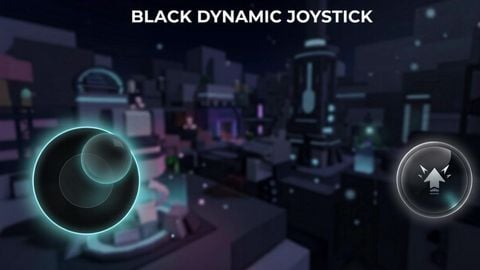
Custom controls

Does it work?
No reports yetNo reports yet. Tried it? Be the first to say.
Description
## 🌌 Custom Mobile Control (Joystick & Jump Button) A custom mobile control system for Roblox. It completely replaces the standard TouchGui with a dynamic joystick and a jump button that you can customize with your own images. ## 🚀 Features * **Any Image Support:** Loads files with any resolution and any name directly from the workspace folder. * **Auto-Search:** The script automatically finds the first image in the folder, so there is no need to configure file names. * **Full Synchronization:** Your image is applied instantly to the stick, its base background, and the dot trail. * **Accidental Tap Protection:** You can configure the joystick to trigger only on swipes, ignoring casual static screen clicks. * **Settings Persistence:** Your selected mode saves automatically to a text file for each specific game. ## 🛠️ Setup Guide The script will automatically create the necessary folders inside your executor's workspace. You just need to drop your images there: ```text workspace/ ├── Joystick picture/ │ └── (Drop any image here for the joystick) ├── Jump picture/ │ └── (Drop any image here for the jump button) └── joystick ID's/ └── (Settings are saved here automatically) ``` > ⚠️ **Important:** Place exactly one image inside the joystick and jump folders so the script grabs the correct texture without confusion. > ## 💬 Chat Commands Configure your control behavior on the fly directly through the in-game text chat: * off — Disables the custom controls and restores the default Roblox buttons. * on — Re-enables the custom control system. * wer — Enables swipe-only mode. The joystick appears only if you drag your finger (ignores simple quick clicks). This setting is saved. * rew — Disables swipe-only mode. The joystick spawns instantly at the exact spot you tap. This setting is saved.
great for using the touch screen on my laptop without roblox freaking out
Keep it up
Really nice but the biggest problem I see is how if you use the Roblox mini thumbstick thing that gets forced onto you in some games, then it keeps letting you zoom your camera which makes it so walking using this script makes your camera horrible. Also this is specifically if you join a game with the mini thumbstick already selected or in a game with the mini thumbstick set by developers. The same thing happens with tap to move.
Wdym you can customize it 😭 it's just a load string that replaces your jump button and dynamic joystick with a different variant