2.6k Views
99 Executions
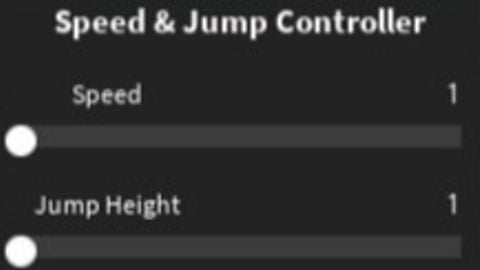
Change speed and jump power
Universal Script 📌
Tatas_scirptFirst script
2 years ago
Please login to perform these actions:Does it work?
No reports yetNo reports yet. Tried it? Be the first to say.
Also noticed:
Description
idk have fun
local Players = game:GetService("Players")
local UserInput = game:GetService("UserInputService")

local player = Players.LocalPlayer
local playerGui = player:WaitForChild("PlayerGui")

local humanoid
local function refreshHumanoid(char)
    humanoid = char:WaitForChild("Humanoid")
end
if player.Character then
    refreshHumanoid(player.Character)
end
player.CharacterAdded:Connect(refreshHumanoid)

local screenGui = Instance.new("ScreenGui")
screenGui.Name = "SpeedJumpGui"
screenGui.ResetOnSpawn = false
screenGui.Parent = playerGui

local frame = Instance.new("Frame", screenGui)
frame.Size = UDim2.new(0, 220, 0, 140)
frame.Position = UDim2.new(0, 10, 0, 10)
frame.BackgroundColor3 = Color3.fromRGB(35, 35, 35)
frame.BorderSizePixel = 0
frame.AnchorPoint = Vector2.new(0, 0)
local title = Instance.new("TextLabel", frame)
title.Size = UDim2.new(1, 0, 0, 25)
title.BackgroundTransparency = 1
title.Text = "Speed & Jump Controller"
title.TextColor3 = Color3.new(1, 1, 1)
title.Font = Enum.Font.SourceSansBold
title.TextSize = 18

local function createSlider(labelText, yOffset, minVal, maxVal, defaultVal, propertyName)

    local lbl = Instance.new("TextLabel", frame)
    lbl.Size = UDim2.new(0, 80, 0, 20)
    lbl.Position = UDim2.new(0, 10, 0, yOffset)
    lbl.BackgroundTransparency = 1
Comments
0Log in to join the conversation. Login
No comments yet. Be the first!