80.6k Views
203 Executions


Does it work?
No reports yetNo reports yet. Tried it? Be the first to say.
Also noticed:
Description
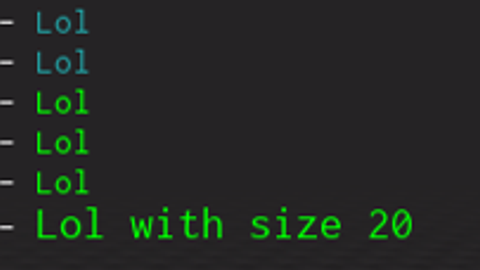
Just an easy "library" to use, to change the output color of your print how to use: Insert your own colors in Modules.Colors, you can do this by e.g using a color picker for it (its in rgb) then do: Output:print("Color","Text") Optionial: Output:print("Color","Text",size) How does it work? Every time you use print or any other method that outputs text (excluding rconsoleprint, of course), it adds a TextLabel to the Developer Console. However, you now have the option to enable RichText, which allows you to incorporate HTML code into your elements. This feature enables you to modify text attributes such as font color, size, and more.
local RunService = game:GetService("RunService")
local CoreGui    = game:GetService("CoreGui")

local Output     = {}
Output.__index   = Output

function Output:ChangeColor(): RBXScriptConnection
    local conn = RunService.Heartbeat:Connect(function()
        local DevConsoleMaster = CoreGui:FindFirstChild("DevConsoleMaster")
        if not DevConsoleMaster then return end

        for _, text in DevConsoleMaster:GetDescendants() do
            if text:IsA("TextLabel") then
                text.RichText = true
            end
        end
    end)

    return conn
end

function Output:print(color: string, text: string, size: number | nil)
    local _text = '<font color="rgb(' .. color .. ')"'
    if size then
        _text = _text .. ' size="' .. tostring(size) .. '"'
    end

    _text = _text .. '>' ..text .. '</font>'
    print(_text)
end

local connection = Output:ChangeColor()
Output:print("0,255,0", "Lol")
Output:print("0,255,0", "Lol with size 20", 20)






101% unc confirmed
nice