114 Views
127 Executions
Building Script
Universal Script 📌
IUSESCRIPTS_000First script
3 months ago
Please login to perform these actions:Does it work?
No reports yetNo reports yet. Tried it? Be the first to say.
Also noticed:
Description
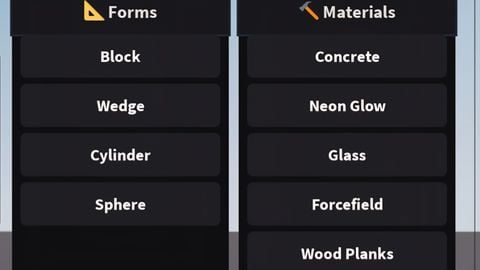
Build Blocks Change Forms Change Materials
local P = game:GetService("Players")
local UIS = game:GetService("UserInputService")
local CoreGui = game:GetService("CoreGui")
local player = P.LocalPlayer
local mouse = player:GetMouse()
local playerGui = player:WaitForChild("PlayerGui")

local safeContainer = (gethui and gethui()) or CoreGui:FindFirstChild("RobloxGui") or CoreGui
if safeContainer:FindFirstChild("DeltaUniversalEngine") then safeContainer.DeltaUniversalEngine:Destroy() end

local selMat = Enum.Material.Concrete
local selCol = BrickColor.new("Medium stone grey")
local selForm = "Block"
local activeTool = "None"

local matList = {
    {N = "Concrete", M = Enum.Material.Concrete, C = BrickColor.new("Medium stone grey")},
    {N = "Neon Glow", M = Enum.Material.Neon, C = BrickColor.new("Toothpaste")},
    {N = "Glass", M = Enum.Material.Glass, C = BrickColor.new("Light blue")},
    {N = "Forcefield", M = Enum.Material.ForceField, C = BrickColor.new("Really red")},
    {N = "Wood Planks", M = Enum.Material.WoodPlanks, C = BrickColor.new("Reddish brown")},
    {N = "Diamond Plate", M = Enum.Material.DiamondPlate, C = BrickColor.new("Dark stone grey")},
    {N = "Marble", M = Enum.Material.Marble, C = BrickColor.new("White")},
    {N = "Ice", M = Enum.Material.Ice, C = BrickColor.new("Pastel Blue")},
    {N = "Brick", M = Enum.Material.Brick, C = BrickColor.new("Rust")}
}

local formsList = {"Block", "Wedge", "Cylinder", "Sphere"}

UIS.InputBegan:Connect(function(input, processed)
    if processed then return end
    if input.UserInputType == Enum.UserInputType.MouseButton1 or input.UserInputType == Enum.UserInputType.Touch then
        local hitPos = mouse.Hit.p
        local targ = mouse.Target

        if mouse.Y < 180 and mouse.X > (mouse.ViewSizeX - 280) then return end

        if activeTool == "HAMMER" and hitPos then
            local p
            if selForm == "Wedge" then p = Instance.new("WedgePart") p.Size = Vector3.new(5, 5, 5)
Comments
0Log in to join the conversation. Login
No comments yet. Be the first!