v1.0: It has been released
1

Reviewed by QueueSherlockPaid revieweron How review works
No reports yet. Tried it? Be the first to say.
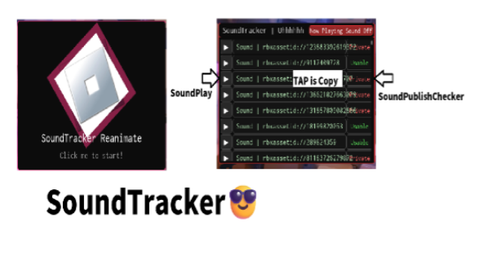
You can view the sounds used in all Roblox games. Since this tool uses CoreUi, there are no security-related UI removals or kicks. Features: Play music, click on a music ID to copy it, and check if the music is public. We hope this helps you achieve what you’ve always wanted to do.
v1.0: It has been released
local Players = game:GetService("Players")
local SoundService = game:GetService("SoundService")
local RunService = game:GetService("RunService")
local UserInputService = game:GetService("UserInputService")
local TweenService = game:GetService("TweenService")
local MarketplaceService = game:GetService("MarketplaceService")

local player = Players.LocalPlayer

local parentGui = player:WaitForChild("PlayerGui")
pcall(function()
	local coreGui = game:GetService("CoreGui")
	if coreGui then parentGui = coreGui end
end)

local screenGui = Instance.new("ScreenGui")
screenGui.Name = "Uhhhhhh_SoundTracker_WithIntro"
screenGui.ResetOnSpawn = false
screenGui.DisplayOrder = 2147483647
screenGui.Parent = parentGui

local previewSound = Instance.new("Sound")
previewSound.Name = "PreviewSound"
previewSound.Volume = 1
previewSound.Parent = SoundService

local introMusic = Instance.new("Sound")
introMusic.Name = "IntroMusic"
introMusic.SoundId = "rbxassetid://1837879082"
introMusic.Volume = 0.5
introMusic.Looped = true
introMusic.Parent = SoundService
introMusic:Play()

local forceMuteAll = false
local introStarted = false

local StylizedObjs = {}

local function Stylize(obj, isStatic)

Script hub
#9 today Rift V3 | 25 Games | Auto Farms, ESP & Updates


Script hub
rsHub | Free No Key Hub | 23 Games


Script hub