
3.6k Views
24 Executions
AWP UI
Universal Script 📌
EnterUsernameFirst script
2 years ago
Please login to perform these actions:Does it work?
No reports yetNo reports yet. Tried it? Be the first to say.
Also noticed:
Description
--a remake of AWP's UI
--skided 100% idc
local G2L = {};

-- StarterGui.ScreenGui
G2L["1"] = Instance.new("ScreenGui", game.CoreGui);


-- StarterGui.ScreenGui.Frame
G2L["2"] = Instance.new("Frame", G2L["1"]);
G2L["2"]["BorderSizePixel"] = 0;
G2L["2"]["BackgroundColor3"] = Color3.fromRGB(31, 31, 31);
G2L["2"]["Size"] = UDim2.new(0, 742, 0, 503);
G2L["2"]["Position"] = UDim2.new(0.21863, 0, 0.27873, 0);
G2L["2"]["BorderColor3"] = Color3.fromRGB(0, 0, 0);


-- StarterGui.ScreenGui.Frame.UICorner
G2L["3"] = Instance.new("UICorner", G2L["2"]);
G2L["3"]["CornerRadius"] = UDim.new(0, 4);


-- StarterGui.ScreenGui.Frame.UIStroke
G2L["4"] = Instance.new("UIStroke", G2L["2"]);
G2L["4"]["Thickness"] = 2;
G2L["4"]["Color"] = Color3.fromRGB(63, 63, 63);


-- StarterGui.ScreenGui.Frame.TextButton
G2L["5"] = Instance.new("TextButton", G2L["2"]);
G2L["5"]["TextWrapped"] = true;
G2L["5"]["BorderSizePixel"] = 0;
G2L["5"]["TextSize"] = 14;
G2L["5"]["TextColor3"] = Color3.fromRGB(113, 113, 113);
G2L["5"]["TextScaled"] = true;
G2L["5"]["BackgroundColor3"] = Color3.fromRGB(255, 255, 255);
G2L["5"]["FontFace"] = Font.new([[rbxasset://fonts/families/Nunito.json]], Enum.FontWeight.Regular, Enum.FontStyle.Normal);
G2L["5"]["Size"] = UDim2.new(0, 35, 0, 35);
G2L["5"]["BackgroundTransparency"] = 1;
G2L["5"]["BorderColor3"] = Color3.fromRGB(0, 0, 0);

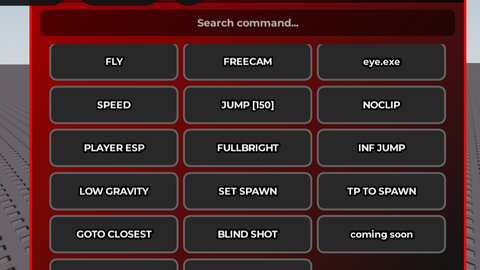

son this is trash
nc