Cool Script Wrong id here one 15722706376
jojosiwah1247's Place
Cool Script Wrong id here one 15722706376 is a jojosiwah1247's Place script for Roblox, uploaded to ScriptBlox on Dec 30, 2025.
Does it work?
No reports yetNo reports yet. Tried it? Be the first to say.
Description
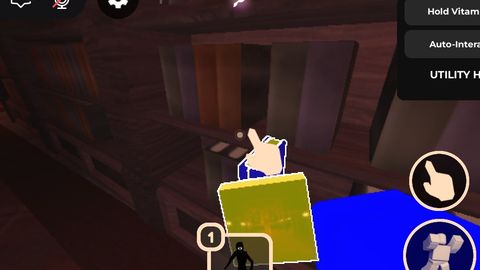
Strict Item ESP: Only highlights the items you care about to keep your screen clean. * Purple (Super Rares): Starlight Bottle, Starlight Jug, Dance, Crucifix, Ball, and Pillow. * Blue (Objectives): Cover1 and Cover2 (Library Books). * Yellow (Pickups): Paper and Vitamins. * Red (Hostiles): Full detection for Figure and FigureRig models. * Green (Players): Real-time highlights for all other players (auto-updates when they join or respawn). * High-Performance Noclip: Toggle that allows you to walk through any wall, door, or gate. Optimized for games with zero anti-cheat. * Instant FullBright: Automatically removes all darkness, shadows, and fog the moment you execute the script. See everything clearly across the entire map. * Auto-Hold Vitamins: A toggle that automatically equips Vitamins from your backpack into your hand. * Live Speed Tracker: A real-time display showing your exact WalkSpeed so you know when your speed boosts are active. * Mobile-Friendly GUI: * Fully draggable menu. * Minimize System: Clicking the "X" shrinks the GUI down to 10% of its size (Mini-mode) so it doesn't block your view while playing. How to Use * Copy the V27 script provided above. * Paste it into your executor of choice (supports mobile and PC). * Tap Execute. * Use the X button on the top right to shrink the menu when you're ready to run! (No anymore new v28 is better but you still can use v27)
-- // UTILITY SUPREME V52.0 (SPAM INTERACT) //
local Players, WS, Lighting, TS, RS = game:GetService("Players"), game:GetService("Workspace"), game:GetService("Lighting"), game:GetService("TweenService"), game:GetService("RunService")
local LP = Players.LocalPlayer

-- // COMPACT UI //
local SG = Instance.new("ScreenGui", (gethui and gethui()) or game:GetService("CoreGui"))
local Main = Instance.new("Frame", SG)
Main.Size, Main.Position = UDim2.new(0, 170, 0, 230), UDim2.new(0, 20, 0.4, 0)
Main.BackgroundColor3, Main.BorderSizePixel = Color3.fromRGB(10, 10, 12), 0
Main.Active, Main.Draggable = true, true
local Stroke = Instance.new("UIStroke", Main)
Stroke.Color, Stroke.Thickness = Color3.fromRGB(0, 150, 255), 1.2
Instance.new("UICorner", Main).CornerRadius = UDim.new(0, 8)

local function addBtn(txt, pos, func)
    local b = Instance.new("TextButton", Main)
    b.Text, b.Size, b.Position = txt, UDim2.new(0, 150, 0, 35), pos
    b.BackgroundColor3, b.TextColor3 = Color3.fromRGB(25, 25, 30), Color3.new(0.9, 0.9, 0.9)
    b.Font, b.TextSize = Enum.Font.GothamBold, 10
    Instance.new("UICorner", b)
    b.MouseButton1Click:Connect(func)
end

-- // 1. PAPER TP (3.5 ABOVE - REDESIGNED) //
addBtn("GET PAPER", UDim2.new(0, 10, 0, 15), function()
    local target = nil
    for _, v in pairs(WS:GetDescendants()) do
        -- Find anything with a prompt that mentions Paper
        if v:IsA("ProximityPrompt") and (v.ObjectText:find("Paper") or v.Parent.Name:find("Paper")) then
            target = v.Parent
            break
        end
    end
    if target then
        LP.Character.HumanoidRootPart.CFrame = target:GetPivot() * CFrame.new(0, 3.5, 0)
        task.wait(0.3)
        fireproximityprompt(target:FindFirstChildWhichIsA("ProximityPrompt", true))
    end
end)

Why *ody commenting 😭🙏🙏
V27 is old—V28.10 is for pros. Here’s why you should switch: 🚀 AUTO-COLLECT: V27 only shows you books. V28.10 snaps to them and picks them up for you in 0.5 seconds. 🧼 CLEAN SCREEN: No messy highlights everywhere. The script does the work, so you don't need the clutter. 🚫 NO BUGS: We removed the "Paper Teleport" so you never get stuck in a loop. 🛡️ SAFE TP: It teleports you near the book, not inside the wall, so you don't get glitched.
Type whatever so i could add in script something Some i can't accept tho