65.6k Views
11 Executions
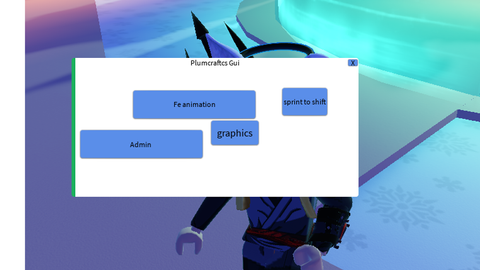
PlumcraftcsGUIv2 small update add sprint please for like up
game Castle executor
2 years ago
Please login to perform these actions:PlumcraftcsGUIv2 small update add sprint please for like up is a game Castle executor script for Roblox, uploaded to ScriptBlox on Jul 29, 2024.
Does it work?
No reports yetNo reports yet. Tried it? Be the first to say.
Also noticed:
Description
small icon
Updates
Script edited: Create script
-- Gui to Lua
-- Version: 3.2

-- Instances:

local PlumcraftcsGui = Instance.new("ScreenGui")
local Mainframe = Instance.new("Frame")
local AdminButton = Instance.new("TextButton")
local TextLabel = Instance.new("TextLabel")
local FeanimationGuiButton = Instance.new("TextButton")
local GraphicsButton = Instance.new("TextButton")
local CloseButton = Instance.new("TextButton")
local SprinttoshiftButton = Instance.new("TextButton")
local Openbutton = Instance.new("TextButton")

--Properties:

PlumcraftcsGui.Name = "PlumcraftcsGui"
PlumcraftcsGui.Parent = game.CoreGui
PlumcraftcsGui.ZIndexBehavior = Enum.ZIndexBehavior.Sibling

Mainframe.Name = "Mainframe"
Mainframe.Parent = PlumcraftcsGui
Mainframe.BackgroundColor3 = Color3.fromRGB(255, 255, 255)
Mainframe.BackgroundTransparency = 0.500
Mainframe.Position = UDim2.new(0.328324556, 0, 0.391986072, 0)
Mainframe.Size = UDim2.new(0, 456, 0, 221)
Mainframe.Style = Enum.FrameStyle.ChatGreen
Mainframe.Visible  = false

AdminButton.Name = "AdminButton"
AdminButton.Parent = Mainframe
AdminButton.BackgroundColor3 = Color3.fromRGB(255, 255, 255)
AdminButton.Position = UDim2.new(-0.0153508773, 0, 0.50678736, 0)
AdminButton.Size = UDim2.new(0, 200, 0, 50)
AdminButton.Style = Enum.ButtonStyle.RobloxRoundDefaultButton
AdminButton.Font = Enum.Font.SourceSans
AdminButton.Text = "Admin"
AdminButton.TextColor3 = Color3.fromRGB(0, 0, 0)
AdminButton.TextSize = 14.000

is it chat gpt generated ahh script :sob: