327 Views
239 Executions
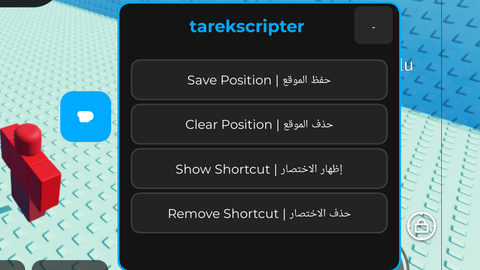
tarekscripter tp button shortcut
Universal Script 📌
6 months ago
Please login to perform these actions:Does it work?
No reports yetNo reports yet. Tried it? Be the first to say.
Also noticed:
Description
create tp button shortcut Arabic & English
local ScreenGui = Instance.new("ScreenGui")
local MainFrame = Instance.new("Frame")
local Title = Instance.new("TextLabel")
local MinimizeBtn = Instance.new("TextButton")
local SavePosBtn = Instance.new("TextButton")
local ClearPosBtn = Instance.new("TextButton")
local ToggleShortcutBtn = Instance.new("TextButton")
local ShortcutBtn = Instance.new("TextButton")
local DeleteShortcutBtn = Instance.new("TextButton")

local TweenService = game:GetService("TweenService")
local savedPosition = nil
local player = game:GetService("Players").LocalPlayer
local playerGui = player:WaitForChild("PlayerGui")

ScreenGui.Name = "tarekscripter_Core"
ScreenGui.Parent = playerGui
ScreenGui.ResetOnSpawn = false

MainFrame.Name = "MainFrame"
MainFrame.Size = UDim2.new(0, 220, 0, 210)
MainFrame.Position = UDim2.new(0.5, -110, 0.5, -105)
MainFrame.BackgroundColor3 = Color3.fromRGB(20, 20, 20)
MainFrame.BorderSizePixel = 0
MainFrame.Active = true
MainFrame.Draggable = true
MainFrame.ClipsDescendants = true
MainFrame.Parent = ScreenGui

local MainCorner = Instance.new("UICorner")
MainCorner.CornerRadius = UDim.new(0, 8)
MainCorner.Parent = MainFrame

local MainStroke = Instance.new("UIStroke")
MainStroke.Color = Color3.fromRGB(0, 170, 255)
MainStroke.Thickness = 1.5
MainStroke.Parent = MainFrame

Title.Size = UDim2.new(1, -40, 0, 35)
Title.Position = UDim2.new(0, 10, 0, 0)
Comments
0Log in to join the conversation. Login
No comments yet. Be the first!