3.9k Views
49 Executions
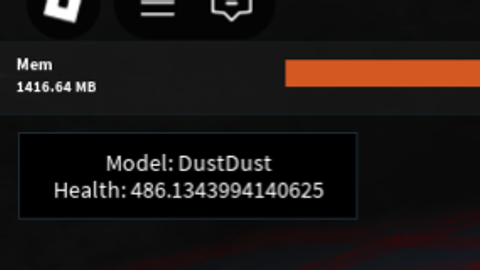
script to check health of models or name, click on a model
Universal Script 📌
samiencarmonaFirst script
2 years ago
Please login to perform these actions:Does it work?
No reports yetNo reports yet. Tried it? Be the first to say.
Also noticed:
Description
literally just check the health of any model with no humanoid
Updates
Script edited: Create script
local Players = game:GetService("Players")
local player = Players.LocalPlayer
local mouse = player:GetMouse()

local gui = Instance.new("ScreenGui", player:WaitForChild("PlayerGui"))
local hoverLabel = Instance.new("TextLabel", gui)

-- GUI Styling
hoverLabel.Size = UDim2.new(0, 200, 0, 50)
hoverLabel.Position = UDim2.new(0, 10, 0, 10)  -- Starting position
hoverLabel.BackgroundColor3 = Color3.new(0, 0, 0)
hoverLabel.TextColor3 = Color3.new(1, 1, 1)
hoverLabel.TextSize = 16
hoverLabel.Font = Enum.Font.SourceSans
hoverLabel.TextWrapped = true
hoverLabel.Visible = true  -- Always visible

-- Make the label draggable
local dragging = false
local dragInput, dragStart, startPos

hoverLabel.InputBegan:Connect(function(input)
    if input.UserInputType == Enum.UserInputType.MouseButton1 then
        dragging = true
        dragStart = input.Position
        startPos = hoverLabel.Position

        input.Changed:Connect(function()
            if input.UserInputState == Enum.UserInputState.End then
                dragging = false
            end
        end)
    end
end)

hoverLabel.InputChanged:Connect(function(input)
    if dragging and input.UserInputType == Enum.UserInputType.MouseMovement then
        local delta = input.Position - dragStart
        hoverLabel.Position = UDim2.new(startPos.X.Scale, startPos.X.Offset + delta.X, startPos.Y.Scale, startPos.Y.Offset + delta.Y)
    end
Comments
0Log in to join the conversation. Login
No comments yet. Be the first!