12.2k Views
309 Executions
message displayer
Universal Script 📌
oogishPublished 5
2 years ago
Please login to perform these actions:Does it work?
No reports yetNo reports yet. Tried it? Be the first to say.
Also noticed:
Description
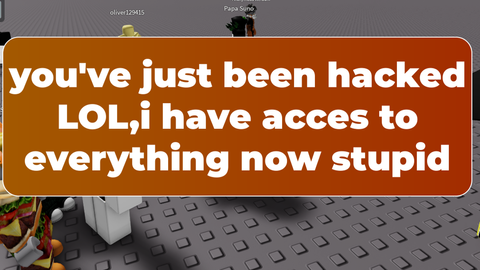
WARNING* THIS SCRIPT IS A PRANK IT DOESNT DO ANYTHING IT IS JUST WORDS DONT TAKE ANYTHING IT SAYS SERIOUSLY (make your friends execute this script so they get scared)
local player = game.Players.LocalPlayer

-- Create ScreenGui
local screenGui = Instance.new("ScreenGui")
local messageFrame = Instance.new("Frame")
local messageLabel = Instance.new("TextLabel")
local uiCorner = Instance.new("UICorner")
local uiGradient = Instance.new("UIGradient")
local uiStroke = Instance.new("UIStroke")

screenGui.Parent = player:WaitForChild("PlayerGui")

-- Style the frame
messageFrame.Size = UDim2.new(0.5, 0, 0.3, 0)
messageFrame.Position = UDim2.new(0.25, 0, 0.5, 0) -- Start lower for animation
messageFrame.BackgroundTransparency = 1 -- Fully transparent initially
messageFrame.Parent = screenGui

-- Add rounded corners to the frame
uiCorner.CornerRadius = UDim.new(0.1, 0) -- Rounded corners
uiCorner.Parent = messageFrame

-- Add a gradient background to the frame
uiGradient.Color = ColorSequence.new({
    ColorSequenceKeypoint.new(0, Color3.fromRGB(255, 140, 0)), -- Orange
    ColorSequenceKeypoint.new(1, Color3.fromRGB(255, 69, 0)) -- Red
})
uiGradient.Parent = messageFrame

-- Add a border stroke to the frame
uiStroke.Thickness = 2
uiStroke.Color = Color3.fromRGB(255, 255, 255) -- White border
uiStroke.Transparency = 1 -- Initially transparent
uiStroke.Parent = messageFrame

-- Style the text label
messageLabel.Size = UDim2.new(1, -20, 1, -20) -- Padding inside the frame
messageLabel.Position = UDim2.new(0, 10, 0, 10)
messageLabel.BackgroundTransparency = 1
messageLabel.Text = "you've just been hacked LOL,i have acces to everything now stupid"






This script only displays on your screen.
gpt
local script, useless.
Prank your friends with this script!