4.3k Views
270.2k Executions
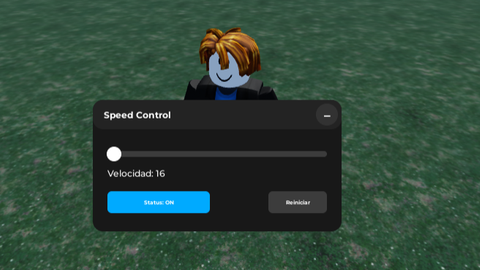
control de velocidad v4
100K executions
Universal Script 📌
Cleooo100K executions
10 months ago
Please login to perform these actions:Does it work?
No reports yetNo reports yet. Tried it? Be the first to say.
Also noticed:
Description
Panel con título centrado y barra arrastrable. Slider interactivo para cambiar la velocidad (1–500). Valor mostrado en tiempo real. Mantiene la velocidad incluso tras respawn. Fuerza que el Humanoid.WalkSpeed siempre coincida con el valor elegido.
Updates
Script edited: Update script
Script edited: Update script
Script edited: Update script
-- Speed Control UI - MOBILE & PC COMPATIBLE
-- LocalScript

local Players = game:GetService("Players")
local UIS = game:GetService("UserInputService")
local TweenService = game:GetService("TweenService")
local RunService = game:GetService("RunService")

local player = Players.LocalPlayer
local playerGui = player:WaitForChild("PlayerGui")

-- ============== CONFIG ==============
local WIDTH, HEIGHT = 340, 180
local COLLAPSED_WIDTH, COLLAPSED_HEIGHT = 180, 40

local MIN_SPEED = 1
local MAX_SPEED = 500
local NORMAL_SPEED = 16

-- ============== STATE ==============
local targetSpeed = NORMAL_SPEED
local savedSpeed = NORMAL_SPEED
local scriptEnabled = false
local minimized = true
local humanoid
local heartbeatConnection
local detectedSpeeds = {} -- Detectar múltiples velocidades
local detectionActive = true

-- ============== CLEAN OLD UI ==============
local old = playerGui:FindFirstChild("SpeedUI")
if old then old:Destroy() end

-- ============== GUI ROOT ==============
local gui = Instance.new("ScreenGui")
gui.Name = "SpeedUI"
gui.ResetOnSpawn = false
gui.Parent = playerGui
Comments
0Log in to join the conversation. Login
No comments yet. Be the first!