6.3k Views
3 Executions
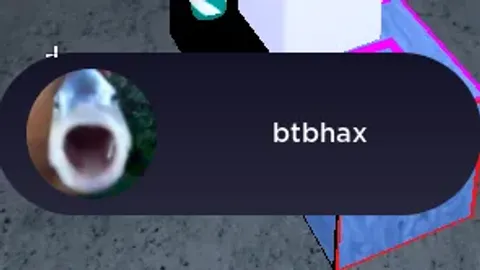
btbhax notification
Universal Script 📌
LunarUIPublished 5
3 years ago
Please login to perform these actions:Does it work?
No reports yetNo reports yet. Tried it? Be the first to say.
Also noticed:
Description
[[Features]] [+] Can Change The Icon [+] Can Change The Text
local TEXT_COLOR = Color3.new(1, 1, 1)
local BACKGROUND_COLOR_START = Color3.fromRGB(30, 30, 60)
local BACKGROUND_COLOR_END = Color3.fromRGB(60, 60, 90)
local ICON_IMAGE = "http://www.roblox.com/asset/?id=14758644530" --// Add your logo here
local GUI_SIZE = UDim2.new(0, 300, 0, 100)
local GUI_POSITION = UDim2.new(0.5, -150, 0.8, 0)
local GUI_DURATION = 5
local SOUND_ID = "rbxassetid://3238007702" --// Put your booting up system in here

local sound = Instance.new("Sound")
sound.SoundId = SOUND_ID
sound.Volume = 2

local screenGui = Instance.new("ScreenGui")
screenGui.Name = "NotificationGui"
screenGui.ZIndexBehavior = Enum.ZIndexBehavior.Sibling

local frame = Instance.new("Frame")
frame.Name = "NotificationFrame"
frame.Size = GUI_SIZE
frame.Position = GUI_POSITION
frame.BorderSizePixel = 0
frame.Parent = screenGui

local uiCorner = Instance.new("UICorner")
uiCorner.CornerRadius = UDim.new(1, 0)
uiCorner.Parent = frame

local gradient = Instance.new("UIGradient")
gradient.Rotation = 90
gradient.Color = ColorSequence.new{
    ColorSequenceKeypoint.new(0, BACKGROUND_COLOR_START),
    ColorSequenceKeypoint.new(1, BACKGROUND_COLOR_END)
}
gradient.Parent = frame

local iconImage = Instance.new("ImageLabel")
iconImage.Name = "Icon"
iconImage.Size = UDim2.new(0, 80, 0, 80)
iconImage.Position = UDim2.new(0, 20, 0.5, -40)




AI Generated lol
@LunarUI the comments are wrote with different grammar than your own, it's obvious that you didn't write this.
@LunarUI very nice but try using Module script
And Also Some Few Parts
@xet1 Literally Had To generate The Clone.NotificationFrame Because it Had Serious Problems With Me💀
least chat gpted script, --// Put your booting up system in here who annotates like that