
1.0k Views
1.3k Executions
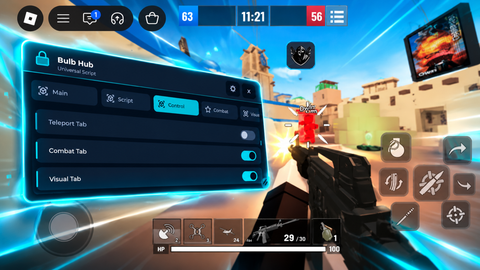
Veridian hub library
Universal Script 📌
TLRSCRIPTERFirst script
7 months ago
Please login to perform these actions:Does it work?
No reports yetNo reports yet. Tried it? Be the first to say.
Also noticed:
Description
เป็นอยู่อะไรเบอร์รี่ที่โครงสร้างภายในสั้นที่สุดและอยู่ในช่วงbeta With the latest update, you can now download images to other people's computers using a Discord link.
Updates
Script edited: Update script
Script edited: 4.2
Script edited: Update script
Script edited: Update script
-- [[ 1. ASSET PREPARATION (Nong Fah) ]] --
local folderName = "furlogo"
local fileName = folderName .. "/mascot.png"
local imageUrl = "https://raw.githubusercontent.com/modcreate1641-collab/Veridian/refs/heads/main/1000109193-01.jpeg"

-- โหลดภาพเตรียมไว้ก่อน (Background Task)
task.spawn(function()
    if not isfolder(folderName) then makefolder(folderName) end
    if not isfile(fileName) then
        local success, content = pcall(game.HttpGet, game, imageUrl)
        if success and #content > 5000 then writefile(fileName, content) end
    end
end)

-- [[ 2. FETCH YOUR MASTERPIECE LIB ]] --
local Success, VeridianLib = pcall(function()
    return loadstring(game:HttpGet("https://raw.githubusercontent.com/modcreate1641-collab/Veridian/refs/heads/main/Furryhub.lua"))()
end)

if not Success or not VeridianLib then
    return warn("!! [ERROR] Pastebin Link Expired or Content Deleted !!")
end

local MainWin = VeridianLib:CreateWindow("Veridianhub")

-- [[ 3. NEW TAB: MASCOT SHOWCASE (หน้าบ้านโชว์รูป) ]] --
MainWin:CreateTab("🖼️ Mascot", function(p)
    local layout = Instance.new("UIListLayout", p)
    layout.Padding = UDim.new(0, 10)
    layout.HorizontalAlignment = Enum.HorizontalAlignment.Center

    -- ส่วนโชว์รูปภาพน้องฟ้าเต็มๆ
    local ImageFrame = Instance.new("ImageLabel", p)
    ImageFrame.Size = UDim2.new(0.9, 0, 0, 300)
    ImageFrame.BackgroundColor3 = Color3.fromRGB(15, 15, 20)
    ImageFrame.Image = isfile(fileName) and getcustomasset(fileName) or ""
    ImageFrame.ScaleType = Enum.ScaleType.Fit

    local corner = Instance.new("UICorner", ImageFrame)
    corner.CornerRadius = UDim.new(0, 10)







tysm its great
@JustinScripter Thank you for your compliment, and we will continue to update. Our UI focuses on simplicity and conciseness. Stay tuned! :)