2.9k Views
8.0k Executions
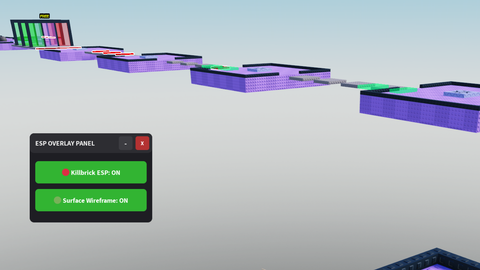
Universal KillBrick and hidden surfaces ESP GUI
Universal Script 📌
2 months ago
Reviewed by QueueSherlockPaid revieweron How review works
Does it work?
No reports yetNo reports yet. Tried it? Be the first to say.
Also noticed:
Description
This is a simple AI-generated script that allows you to see invisible surfaces and killbricks, often useful for obby's You can use the Delete key (Del) on your keyboard to open and close the GUI. This keybind can be changed inside the script's code in the configuration section. Features: - Invisible surface ESP - Killbrick ESP - Draggable GUI - Close and Minimise buttons
-- LocalScript inside StarterPlayerScripts
local Workspace = game:GetService("Workspace")
local Players = game:GetService("Players")
local UserInputService = game:GetService("UserInputService")

local localPlayer = Players.LocalPlayer
local playerGui = localPlayer:WaitForChild("PlayerGui")

-----------------------------------------
-- CONFIGURATION
-----------------------------------------
-- Change "Delete" to any key you want (e.g., Enum.KeyCode.V)
local TOGGLE_KEY = Enum.KeyCode.Delete

-----------------------------------------
-- STATE DATA
-----------------------------------------
local killbrickESPActive = false
local surfaceESPActive = false
local isMinimized = false

-----------------------------------------
-- UI CREATION
-----------------------------------------
local screenGui = Instance.new("ScreenGui")
screenGui.Name = "ESPControlMenu"
screenGui.ResetOnSpawn = false
screenGui.Parent = playerGui

-- Main Container Frame
local mainFrame = Instance.new("Frame")
mainFrame.Name = "MainFrame"
mainFrame.Size = UDim2.new(0, 220, 0, 160)
mainFrame.Position = UDim2.new(0, 20, 0, 20)
mainFrame.BackgroundColor3 = Color3.fromRGB(30, 30, 35)
mainFrame.BorderSizePixel = 0
mainFrame.Active = true
mainFrame.Draggable = true -- Drag via title bar or main frame
mainFrame.Parent = screenGui

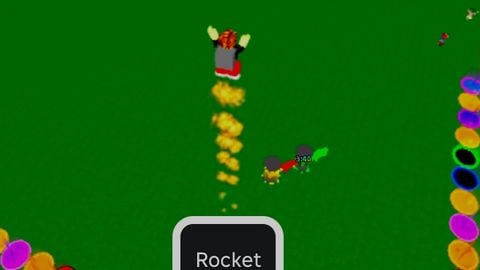



Game name please
@mexahu_20, apologies for the late response. The game name in the image is "Think Twice".