26.5k Views
2.0k Executions
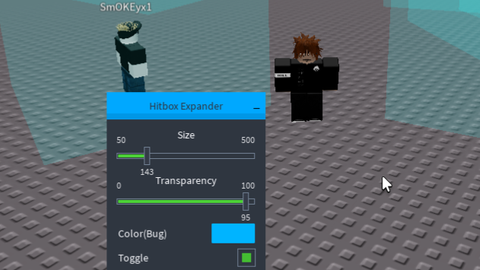
Universal Hitbox Expander npc
Universal Script 📌
kinsroo10 followers
2 years ago
Please login to perform these actions:Does it work?
No reports yetNo reports yet. Tried it? Be the first to say.
Also noticed:
Description
npc hitbox expander in beta and open source (The script for the NPC is still in beta, so problems may arise)
local libraryUrl = "https://raw.githubusercontent.com/bloodball/-back-ups-for-libs/main/turtle"
local librarySuccess, library = pcall(loadstring, game:HttpGet(libraryUrl))
if not librarySuccess then
    error("Failed to load the library from URL: " .. libraryUrl)
end

-- Create the UI window for the Hitbox Expander
local OwO = library():Window("Hitbox Expander")

-- Global configuration variables
-- For players
_G.HeadSize = 50 / 10         -- Default size: 5 (50 divided by 10)
_G.HeadTransparency = 0.7     -- Default transparency: 0.7
_G.HeadColor = Color3.fromRGB(255, 255, 255)
_G.Enabled = false            -- Toggle for players

-- For NPCs
_G.NPCHeadSize = 50 / 10        -- Default size: 5 (50 divided by 10)
_G.NPCHeadTransparency = 0.7    -- Default transparency: 0.7
_G.NPCHeadColor = Color3.fromRGB(255, 255, 255)
_G.NPCEnabled = false           -- Toggle for NPCs

-- Tables to store original properties of players' and NPCs' HumanoidRootParts
local originalProps = {}
local originalNPCProps = {}

-- Slider to control the player head hitbox size.
-- Slider values from 50 to 500 (step 10) divided by 10, so size from 5 to 50.
OwO:Slider("Size", 50, 500, 10, function(value)
    _G.HeadSize = value / 10
end)

-- Slider to control the player hitbox transparency.
-- Slider values from 0 to 100 (step 1) divided by 100.
OwO:Slider("Transparency", 0, 100, 1, function(value)
    _G.HeadTransparency = value / 100
end)

-- ColorPicker to control the player hitbox color.
OwO:ColorPicker("Color(Bug)", _G.HeadColor, function(color)







For mobile user it only need to force portrait mode so you can active the toggle npc hitbox
Add teamcheck pls
some games also have an anti-cheat that does not allow you to change the size of hitboxes, and do other things
game*
@Alucard, the problem is that for the most part NPCs that look like animals, or monsters, etc., that is, do not look like people, but have a custom body type, also have modified names of body parts, the same HumanoidRootPart may not be there, and in order for this script to work, this body part is necessary. In order to increase the hitboxes of the same animals in Westbound, I will have to write a separate script, specifically for this mode
@Alucard, thi*box Expander can only increase the hitboxes of those NPCs that look like players, that is, their appearance, any other NPCs with Custom Rig, such as animals, are ignored due to other names and many other reasons
Doesn't work in Blackhawk rescue mission 5. The NPCs are the same, but their heads don't change, but I can change them through dex