4.6k Views
1.2k Executions
TpWalk with Acceleration and Friction
Universal Script 📌
1 year ago
Please login to perform these actions:Does it work?
No reports yetNo reports yet. Tried it? Be the first to say.
Also noticed:
Description
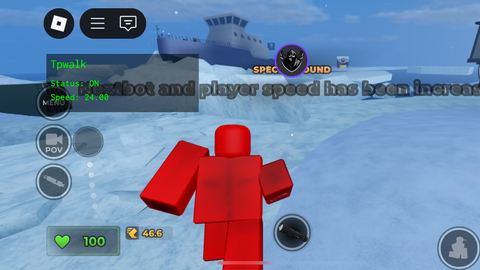
Features: - script still works if even player dies - acceleration - friction - modifiable script - Support all Games Updated: - mobile support switch on/off ( Click "Status: ON/OFF" ) if you don't want to be seen using speed hack use this to cover it :} Recommended Game to using this Script: Evade
local Players = game:GetService("Players")
local RunService = game:GetService("RunService")
local UserInputService = game:GetService("UserInputService")

local player = Players.LocalPlayer
local playerGui = player:WaitForChild("PlayerGui")

local Settings = {
    Enabled = true,
    MaxSpeed = 24,
    Acceleration = 26,
    Friction = 60,
    Keybinds = {
        Toggle = Enum.KeyCode.T,
        Hide = Enum.KeyCode.H,
        Remove = Enum.KeyCode.R,
    },
}

local character, humanoid, hrp
local currentVelocity = Vector3.new(0,0,0)
local inputState = {
    forward = false,
    backward = false,
    left = false,
    right = false,
    gamepadVector = Vector2.new(0,0),
}
local guiVisible = true
local running = true
local isDead = false

local screenGui = Instance.new("ScreenGui")
screenGui.Name = "TpwalkGui"
screenGui.ResetOnSpawn = false
screenGui.Parent = playerGui

local frame = Instance.new("Frame")
frame.Size = UDim2.new(0, 220, 0, 84)
frame.Position = UDim2.new(0, 20, 0, 20)








Wait how to off tpwalk then?
@BoomHajjah T
@BoomHajjah Mobile: Click "Status: ON" PC/Keyboard: Click T
That great
Ahh