17.5k Views
4.2k Executions
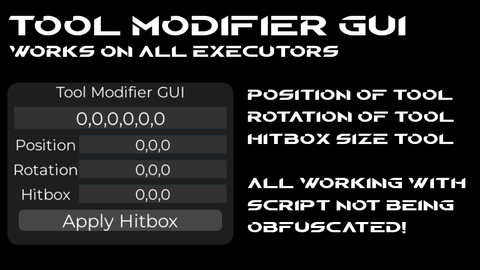
Tool modifier GUI
Universal Script 📌
RAFIHACKERFirst script
1 year ago
Please login to perform these actions:Does it work?
No reports yetNo reports yet. Tried it? Be the first to say.
Also noticed:
Description
1 Input X,Y,Z,RX,RY,RZ 2 Input X,Y,Z 3 input RX,RY,RZ 4 input HX,HY,HZ It shows a green outline on the hitbox of ur tool and click apply if you want the hitbox to work Hitbox is H btw Rotation is R btw
local player = game.Players.LocalPlayer
local playerGui = player:WaitForChild("PlayerGui")

-- ScreenGui
local gui = Instance.new("ScreenGui")
gui.Name = "ToolGripGUI"
gui.ResetOnSpawn = false
gui.Parent = playerGui

-- Frame
local frame = Instance.new("Frame")
frame.Size = UDim2.new(0, 320, 0, 230)
frame.Position = UDim2.new(0.8, 0, 0.7, 0)
frame.BackgroundColor3 = Color3.fromRGB(30, 30, 30)
frame.BorderSizePixel = 0
frame.Parent = gui

local corner = Instance.new("UICorner")
corner.CornerRadius = UDim.new(0, 16)
corner.Parent = frame

-- Title
local title = Instance.new("TextLabel")
title.Size = UDim2.new(1, 0, 0, 25)
title.BackgroundTransparency = 1
title.Text = "Tool Grip + Hitbox Editor"
title.TextColor3 = Color3.fromRGB(255,255,255)
title.TextScaled = true
title.Font = Enum.Font.Gotham
title.Parent = frame

-- Main textbox (Grip)
local fullBox = Instance.new("TextBox")
fullBox.Size = UDim2.new(1, -20, 0, 30)
fullBox.Position = UDim2.new(0, 10, 0, 35)
fullBox.BackgroundColor3 = Color3.fromRGB(50,50,50)
fullBox.TextColor3 = Color3.fromRGB(255,255,255)
fullBox.TextScaled = true
fullBox.Font = Enum.Font.Gotham
fullBox.ClearTextOnFocus = false







Bro, when I run the script on mobile, it runs on a fixed screen and can't be used freely; it doesn't have the movement capabilities to move the script.